-
-
Downloads offline
Downloads: 2003
File Size: 649434
Version: 0.9.0
Author: Thorgrim
-
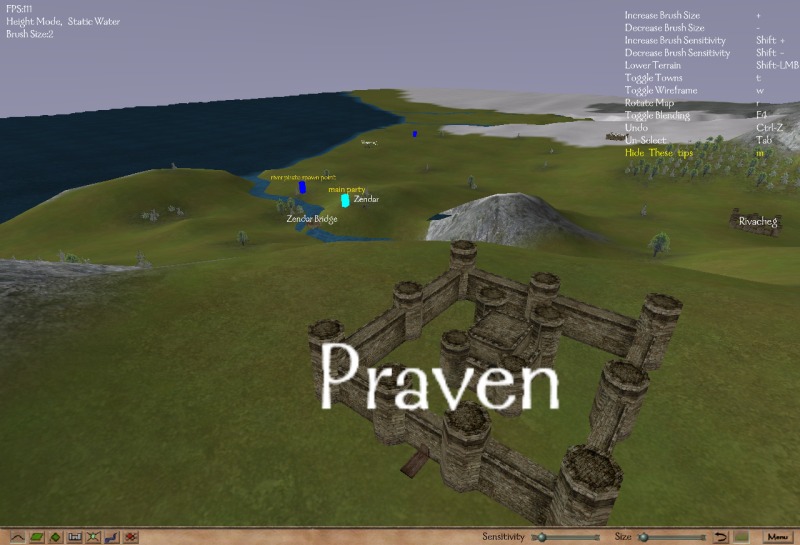
This tool is for modifying the Mount & Blade world map. It allows you to adjust the height of the map, paint textures onto the map, change the location, name and icon of towns and spawn points, or create a whole new world for you mod.
glut.dll - Required for users who have not used a previous version (Extract to the same directory as MapEditor.exe) (Included in zip file)
Features
Map viewing
Map height editing
Map texture editing:
paint any terrain type over the terrain, including forest to add trees
Adjustable lighting
Automatic blank template generation
30 brush sizes
Support for mods as well as the Native module in settings.cfg
Town and spawn point editing
Vertex editing on all 3 axis
Map bounds display
Blending like seen in game
Tools to make editing as easy as possible such as level caps, automatic shore smoothing and automatic texturing of land.
File History Version 0.9.0 - 20/06/2008
- Added support for 0.95x and 0.96x
- Fixed some bugs with tree rendering
- Fixed a number of tools so they work with the new water types (eg the shore smoothing tool)
Version 0.8.5 - 7/10/2007
- Added support for 0.89x party file format (NOTE: this means that this version map editor is no longer compatible with 0.808 or earlier)
- Added a number of the new terrain types such as ford and desert
- Added the ability to rotate map icons (as now supported in M&B 0.89x+)
- Fixed some problems which caused the module.ini file to be saved incorrectly in 0.89x
Version 0.8.3 - 8/3/2007
- When importing an obj to replace the map, textures are now preserved.
Version 0.8.2 - 6/3/2007
- Fixed a bug that was causing a crash when saving the map (and messing up parties.txt)
Version 0.8.1 - 27/12/2006
- Fixed a bug that prevented some towns being shown.
- Hidden towns are now also displayed
Version 0.8.0 - 26/11/2006
- Updated so that it now works with 0.800+
- When exporting map to .obj, texture co-ordinates are also exported. Use Map_Pallet.png in the editorData directory as the texture.
- Map_Pallet.png may also be used for painting new colour maps for importing into the map editor.
- M&B path name may now include spaces when the full path is entered
- Fixed some minor bugs
Version 0.7.7 - 14/4/2006
- Works for M&B 0.730+ (0.730, 0.731, 0.750)
- Fixes for a number of crashing bugs with welding, deleting faces, cloning faces, smoothing etc
- Fixed some texture problems (with non square textures)
Version 0.7.6 - 26/1/2006
- Fixed borders (north and south were the wrong way round)
- Towns / spawns should be easier to move now (left click to select, right click to move)
- Can now adjust camera speed by dragging a slider (click the little blob in the bottom left corner)
- Double clicking a vertex now selects all vertices in the map
- Added a "weld selected" tool (Ctrl-V as default) that welds all vertices that are within a set radius of another vertex
(set the weld radius in settings.cfg)
Version 0.7.5 - 18/1/2006
- Added a minimap
- Minimap has 4 sizes: small, large, fullscreen and minimised.
- Can toggle the minimap with a hotkey (default is spacebar) or by clicking the buttons in the corner.
- Minimap has 2 modes: textured and un-textured
Version 0.7.4 - 17/1/2006
- Added face scaling (like vertex scaling)
- Some more tweaks to shore smoothing (should be less crashing etc)
- Added thinning, to thin selected faces. This is useful for making rivers thinner, (or wider by selecting the terrain around it), as well as creating roads.
- Some GUI changes / additions.
Version 0.7.3b - 12/1/2006
- Updated the shore smoothing tool. It will no longer "twist" the shorelines, so can be used many times on the same shore if needed.
It is still recommended that you limit the number of times you use this tool however.
- Heightmaps are now imported and exported with height 0 = pure black. Pure white = height of 38.25.
- Added a redo button: shift + Undo button (so Ctrl-Shift-z as default)
Version 0.7.3 - 11/1/2006
The main feature of this update is the new shore smoothing mode.
This should save you a lot of time when making a new map!
Note that it also does some optimising to the river edges, as well as adjusting vertices.
This tool should only be used once on any section of water!
Select the section you wish to smooth in face selection mode, otherwise the whole map will be smoothed. An easy way to smooth a river is to enter face select mode, double click the river, then click the smooth button. The same can be done for an ocean or lake.
It is still experimental, so dont complain if your map blows up (always keep backups)
- Pg Up and Pg down now perform the same functions as the scroll wheel, for those who dont have one.
- Added a tool to smooth all shore / river edges. The default key is Ctrl-S, or press the smooth button in face mode.
- Ctrl+Any letter key is now bind-able to any of the functions in the controls list.
- Some key shortcuts have changed, check Menu > Options > Controls
- Changed the popup mode selection menus, hopefully they are now easier to use
Version 0.7.2 - 9/1/2006
- Added heightmap exporting. Keep in mind this is not very accurate, as the map is fully 3d, where a heightmap is only 2d of limited resolution.
The exported heightmap will be the same resolution as the current window.
- Added obj exporting. Select the faces you with to export, then select export from the menu.
- Added obj importing. The mesh will currently replace the entire previous mesh.
- Added colour map importing and exporting. Similar to heightmap importing and exporting, it cannot be totally accurate.
Any bmp with the suffix -c.bmp will be read as a colour map.
With the addition of this feature, it is now possible to somewhat convert a map to a different mesh resolution.
Of course some tweaking will still be needed at terrain seems.
Version 0.7.1 - 8/1/2006
- Added heightmap importing: place any bmps you with to use as a heightmap into editorData/heightmaps.
Then use Menu > Import and select the heightmap.
Note that only bmps are supported for now.
The darker the hue of a pixel the lower the terrain will become.
This works on any map, with any size bmp, and will scale to fit the map.
- Fixed y value of location display / copying (it was inverted)
Version 0.7 - 1/1/2006
- Changed font to use M&B font. Looks better, and renders much faster.
- Added an outer border, roughly where the camera can see to when at the very edge of the map.
- When dragging towns in selection mode, they now move to the exact location of the mouse.
- Can now hold 'z' (or another key if you change the key bindings) to display the location the cursor is pointing to.
- When z is released, the location is copied to the clipboard, for easy pasting into python files.
- A number of useability fixes for GUI etc.
Thorgrims Map Editor
Downloads offline
This tool is for modifying the Mount & Blade world map. It allows you to adjust the height of the map, paint textures onto the map, change the location, name and icon of towns and spawn points, or create a whole new world for you mod.
glut.dll - Required for users who have not used a previous version (Extract to the same directory as MapEditor.exe) (Included in zip file)
Features
Map viewing
Map height editing
Map texture editing:
paint any terrain type over the terrain, including forest to add trees
Adjustable lighting
Automatic blank template generation
30 brush sizes
Support for mods as well as the Native module in settings.cfg
Town and spawn point editing
Vertex editing on all 3 axis
Map bounds display
Blending like seen in game
Tools to make editing as easy as possible such as level caps, automatic shore smoothing and automatic texturing of land.
File History Version 0.9.0 - 20/06/2008
- Added support for 0.95x and 0.96x
- Fixed some bugs with tree rendering
- Fixed a number of tools so they work with the new water types (eg the shore smoothing tool)
Version 0.8.5 - 7/10/2007
- Added support for 0.89x party file format (NOTE: this means that this version map editor is no longer compatible with 0.808 or earlier)
- Added a number of the new terrain types such as ford and desert
- Added the ability to rotate map icons (as now supported in M&B 0.89x+)
- Fixed some problems which caused the module.ini file to be saved incorrectly in 0.89x
Version 0.8.3 - 8/3/2007
- When importing an obj to replace the map, textures are now preserved.
Version 0.8.2 - 6/3/2007
- Fixed a bug that was causing a crash when saving the map (and messing up parties.txt)
Version 0.8.1 - 27/12/2006
- Fixed a bug that prevented some towns being shown.
- Hidden towns are now also displayed
Version 0.8.0 - 26/11/2006
- Updated so that it now works with 0.800+
- When exporting map to .obj, texture co-ordinates are also exported. Use Map_Pallet.png in the editorData directory as the texture.
- Map_Pallet.png may also be used for painting new colour maps for importing into the map editor.
- M&B path name may now include spaces when the full path is entered
- Fixed some minor bugs
Version 0.7.7 - 14/4/2006
- Works for M&B 0.730+ (0.730, 0.731, 0.750)
- Fixes for a number of crashing bugs with welding, deleting faces, cloning faces, smoothing etc
- Fixed some texture problems (with non square textures)
Version 0.7.6 - 26/1/2006
- Fixed borders (north and south were the wrong way round)
- Towns / spawns should be easier to move now (left click to select, right click to move)
- Can now adjust camera speed by dragging a slider (click the little blob in the bottom left corner)
- Double clicking a vertex now selects all vertices in the map
- Added a "weld selected" tool (Ctrl-V as default) that welds all vertices that are within a set radius of another vertex
(set the weld radius in settings.cfg)
Version 0.7.5 - 18/1/2006
- Added a minimap
- Minimap has 4 sizes: small, large, fullscreen and minimised.
- Can toggle the minimap with a hotkey (default is spacebar) or by clicking the buttons in the corner.
- Minimap has 2 modes: textured and un-textured
Version 0.7.4 - 17/1/2006
- Added face scaling (like vertex scaling)
- Some more tweaks to shore smoothing (should be less crashing etc)
- Added thinning, to thin selected faces. This is useful for making rivers thinner, (or wider by selecting the terrain around it), as well as creating roads.
- Some GUI changes / additions.
Version 0.7.3b - 12/1/2006
- Updated the shore smoothing tool. It will no longer "twist" the shorelines, so can be used many times on the same shore if needed.
It is still recommended that you limit the number of times you use this tool however.
- Heightmaps are now imported and exported with height 0 = pure black. Pure white = height of 38.25.
- Added a redo button: shift + Undo button (so Ctrl-Shift-z as default)
Version 0.7.3 - 11/1/2006
The main feature of this update is the new shore smoothing mode.
This should save you a lot of time when making a new map!
Note that it also does some optimising to the river edges, as well as adjusting vertices.
This tool should only be used once on any section of water!
Select the section you wish to smooth in face selection mode, otherwise the whole map will be smoothed. An easy way to smooth a river is to enter face select mode, double click the river, then click the smooth button. The same can be done for an ocean or lake.
It is still experimental, so dont complain if your map blows up (always keep backups)
- Pg Up and Pg down now perform the same functions as the scroll wheel, for those who dont have one.
- Added a tool to smooth all shore / river edges. The default key is Ctrl-S, or press the smooth button in face mode.
- Ctrl+Any letter key is now bind-able to any of the functions in the controls list.
- Some key shortcuts have changed, check Menu > Options > Controls
- Changed the popup mode selection menus, hopefully they are now easier to use
Version 0.7.2 - 9/1/2006
- Added heightmap exporting. Keep in mind this is not very accurate, as the map is fully 3d, where a heightmap is only 2d of limited resolution.
The exported heightmap will be the same resolution as the current window.
- Added obj exporting. Select the faces you with to export, then select export from the menu.
- Added obj importing. The mesh will currently replace the entire previous mesh.
- Added colour map importing and exporting. Similar to heightmap importing and exporting, it cannot be totally accurate.
Any bmp with the suffix -c.bmp will be read as a colour map.
With the addition of this feature, it is now possible to somewhat convert a map to a different mesh resolution.
Of course some tweaking will still be needed at terrain seems.
Version 0.7.1 - 8/1/2006
- Added heightmap importing: place any bmps you with to use as a heightmap into editorData/heightmaps.
Then use Menu > Import and select the heightmap.
Note that only bmps are supported for now.
The darker the hue of a pixel the lower the terrain will become.
This works on any map, with any size bmp, and will scale to fit the map.
- Fixed y value of location display / copying (it was inverted)
Version 0.7 - 1/1/2006
- Changed font to use M&B font. Looks better, and renders much faster.
- Added an outer border, roughly where the camera can see to when at the very edge of the map.
- When dragging towns in selection mode, they now move to the exact location of the mouse.
- Can now hold 'z' (or another key if you change the key bindings) to display the location the cursor is pointing to.
- When z is released, the location is copied to the clipboard, for easy pasting into python files.
- A number of useability fixes for GUI etc.
top