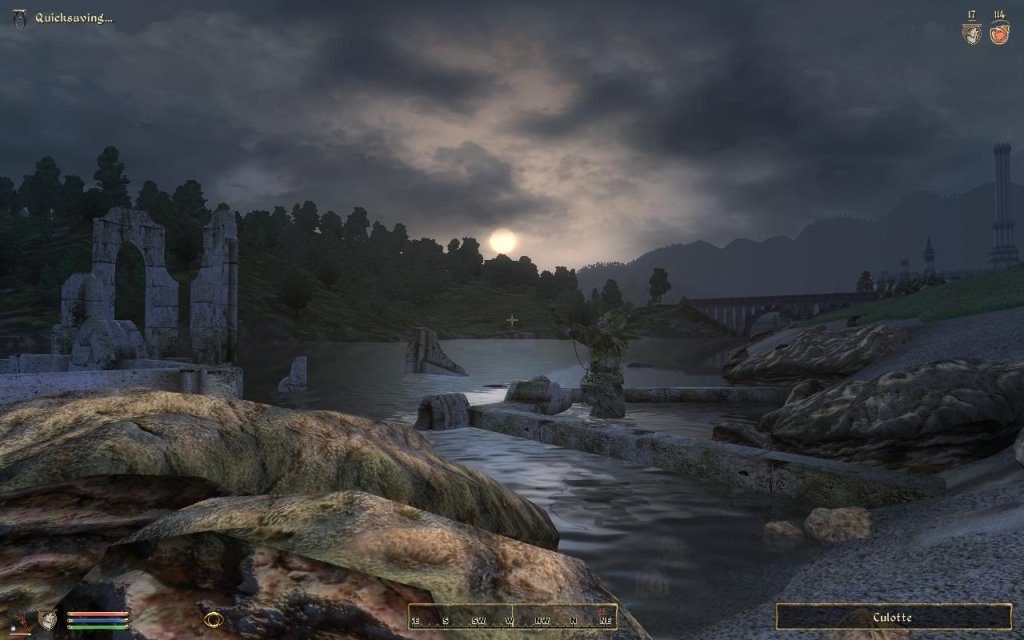
This mod gives the Oblivion UI the most extensive facelift yet. It's goal is to rid the pc version of the horrid xbox interface. Fonts are smaller, settings can be adjusted in game, user controls are scaled, more info on screen, and the hud is vastly improved.
OBMM Install
This requires OBMM v1.1.12+ and 'Allow additional script types' to be set in OBMM settings.
1. Extract OMOD file in the archive to "(Oblivion install folder)obmmmods"
2. Start Oblivion Mod Manager.
3. Make sure the icon by the mod name is green/tan.
4. Double-click the the mod in the right-hand side of the OBMM screen.
5. After the install process has finished, icon should turn blue.
6. DarNify Books in Wrye Bash.
Go to darnified.net for detailed instructions.
7z Install
1. Extract archive to OblivionData.
2. Copy the desired fonts to OblivionDatafonts
3. Edit "My DocumentsMy GamesOblivionOblivion.ini" to use the new fonts.
Normal fonts:
[Fonts]
SFontFile_1=DataFontsKingthings_Regular.fnt
SFontFile_2=DataFontsDarN_Kingthings_Petrock_14.fnt
SFontFile_3=DataFontsDarN_Kingthings_Petrock_16.fnt
SFontFile_4=DataFontsDarN_Oblivion_28.fnt
SFontFile_5=DataFontsHandwritten.fnt
Large fonts:
[Fonts]
SFontFile_1=DataFontsKingthings_Regular.fnt
SFontFile_2=DataFontsDarN_LG_Kingthings_Petrock_14.fnt
SFontFile_3=DataFontsDarN_LG_Kingthings_Petrock_18.fnt
SFontFile_4=DataFontsDarN_Oblivion_28.fnt
SFontFile_5=DataFontsHandwritten.fnt
SFontFile_1 will depend on your choice (see 4.4).
4. Custom options (custom_files folder)
4.1: If you're using AF/KCAS/Realistic Leveling for leveling, copy KCAS_levelup_menu.xml to "Datamenus". Remove the KCAS_ prefix. Set the "_KCAS" setting in stats_config.xml to &true;.
4.2: The classic inventory can be installed by copying the contents of the "classic_inventory" folder to the "Data" folder.
4.3: If you're using Trollf's "Loading Screens Themed Replacer", copy trollf_loading_menu.xml to the "Datamenus" folder. Remove the trollf_ prefix.
4.4: The fonts folder has a selection of fonts suitable for replacing font 1 (preview included). Copy the desired .fnt and .tex pair to "Datafonts", and edit the ini.
4.5 For the "No Quest Added popup" option, copy empty.xml to "Datamenusgeneric", and name it quest_added.xml.
5. DarNify Books
DarNified Books is handled in Wrye Bash from v1.3.1. You need Wrye Bash 1.54+.
To DarNify your books, Rebuild Patch and select "Tweak Assorted->DarNify Books".
Go to darnified.net for detailed instructions.
Uninstall OMOD
1. Start Oblivion Mod Manager.
2. Double-click the name of the mod in the right-hand side of the OBMM screen, click Yes. (icon should turn green)
Uninstall 7z
1. Delete the files you don't want.
2. Edit your ini to the original font setup:
[Fonts]
SFontFile_1=DataFontsKingthings_Regular.fnt
SFontFile_2=DataFontsKingthings_Shadowed.fnt
SFontFile_3=DataFontsTahoma_Bold_Small.fnt
SFontFile_4=DataFontsDaedric_Font.fnt
SFontFile_5=DataFontsHandwritten.fnt
Usage
All config files are in "Datamenusprefabsdarn". The in game settings are in hudmainmenu_config.xml, and the name of the setting to adjust is displayed in parenthesis at the end of the help text when hovering the setting in game.
In general, the files are named similarly to their core files with a "_config" at the end. The Map Menu is configured in map_config.xml, etc. All the new (1.3.0) options can be configured there. If you're installing via OBMM, the filenames and their config files are listed in the descriptions.
You'll find several articles on installation, configuration and DarNified Books in my Articles forum.
Compatibility
If you have other ui mods installed some menus may conflict, ie. some of my menus rely on screen real estate not being occupied, and therefore some overlap can occur. When mixing mods, make sure the matching config file (if present in the archive) is included. inventory_config.xml should always accompany inventory_menu.xml. Using BTMods inventory_config.xml with my inventory_menu.xml will produce strange results. :)
See paragraph 4.x of the "7z Install" section for specific compatability menus included.
nGCD: Use the levelup_menu.xml provided with nGCD.
Raised Spellmaking Enchantments Limits/Supreme Magicka/L.A.M.E: This funcionality is already part of DarNified UI. The settings are in enchantmentsetting_config.xml.
Immersive Interface: This mod should not be used in conjunction with DUI. The HUD can be configured to look and function just like it.
Natural Environments: This mod includes modified gfx for some of the hud elements. Take care not to include the textures/menus* folders when installing this.
OblivionXP Levelling: Use the Stats Menu and LevelUp Menu included with OXP. OBMM will report a conflict with this, but no files will be overwritten.
Known Issues or Bugs
- When you reach top rank in a faction, the next rank label will read 'DUMMY'. There are three fixes for this (in preferred order):
1. Get the Unofficial Oblivion Patch v2.2.0+.
2. Get the Faction Rank Fix: Here or here.
3. Use this workaround that will hide the next rank info completely:
Open stats_config.xml, change <_s4fnrv> &true; to <_s4fnrv> &false; .
- As of v1.3.0, the HUD functions as a settings repository for the other menus, and is a required menu. The Breathmeter for example, takes it's alpha value from the hud. If the hud doesn't have that value on offer, the alpha will be 0, which is invisible... This may be possible to work around, and I will look into it if there's a serious demand for it.
History
1.3.2, 2008/12/07
- Fixed white square bug in the stats menu
- Fixed minimum (no) area in enchantmentsetting menu says "9"
- Fixed a height inconsistency with the Stats Menu
- Cleaned up Magic Menu a bit
- Added config file for Persuasion Menu
- Added scrollbar to Message Menu for long texts (eg. Kyoma's Journal Mod)
- Added alignment options to HUD Location text
- Script: Added compatability for Oblivion XP Levelling
- Script: Fixed some issues with modular installs
- Script: Hopefully fixed "Palatino" error
- Script: Mod detection now also detects active mods
You'll find the complete changelog in the ReadMe and here.
DarNified UI
Downloads offline
This mod gives the Oblivion UI the most extensive facelift yet. It's goal is to rid the pc version of the horrid xbox interface. Fonts are smaller, settings can be adjusted in game, user controls are scaled, more info on screen, and the hud is vastly improved.
OBMM Install
This requires OBMM v1.1.12+ and 'Allow additional script types' to be set in OBMM settings.
1. Extract OMOD file in the archive to "(Oblivion install folder)obmmmods"
2. Start Oblivion Mod Manager.
3. Make sure the icon by the mod name is green/tan.
4. Double-click the the mod in the right-hand side of the OBMM screen.
5. After the install process has finished, icon should turn blue.
6. DarNify Books in Wrye Bash.
Go to darnified.net for detailed instructions.
7z Install
1. Extract archive to OblivionData.
2. Copy the desired fonts to OblivionDatafonts
3. Edit "My DocumentsMy GamesOblivionOblivion.ini" to use the new fonts.
Normal fonts:
[Fonts]
SFontFile_1=DataFontsKingthings_Regular.fnt
SFontFile_2=DataFontsDarN_Kingthings_Petrock_14.fnt
SFontFile_3=DataFontsDarN_Kingthings_Petrock_16.fnt
SFontFile_4=DataFontsDarN_Oblivion_28.fnt
SFontFile_5=DataFontsHandwritten.fnt
Large fonts:
[Fonts]
SFontFile_1=DataFontsKingthings_Regular.fnt
SFontFile_2=DataFontsDarN_LG_Kingthings_Petrock_14.fnt
SFontFile_3=DataFontsDarN_LG_Kingthings_Petrock_18.fnt
SFontFile_4=DataFontsDarN_Oblivion_28.fnt
SFontFile_5=DataFontsHandwritten.fnt
SFontFile_1 will depend on your choice (see 4.4).
4. Custom options (custom_files folder)
4.1: If you're using AF/KCAS/Realistic Leveling for leveling, copy KCAS_levelup_menu.xml to "Datamenus". Remove the KCAS_ prefix. Set the "_KCAS" setting in stats_config.xml to &true;.
4.2: The classic inventory can be installed by copying the contents of the "classic_inventory" folder to the "Data" folder.
4.3: If you're using Trollf's "Loading Screens Themed Replacer", copy trollf_loading_menu.xml to the "Datamenus" folder. Remove the trollf_ prefix.
4.4: The fonts folder has a selection of fonts suitable for replacing font 1 (preview included). Copy the desired .fnt and .tex pair to "Datafonts", and edit the ini.
4.5 For the "No Quest Added popup" option, copy empty.xml to "Datamenusgeneric", and name it quest_added.xml.
5. DarNify Books
DarNified Books is handled in Wrye Bash from v1.3.1. You need Wrye Bash 1.54+.
To DarNify your books, Rebuild Patch and select "Tweak Assorted->DarNify Books".
Go to darnified.net for detailed instructions.
Uninstall OMOD
1. Start Oblivion Mod Manager.
2. Double-click the name of the mod in the right-hand side of the OBMM screen, click Yes. (icon should turn green)
Uninstall 7z
1. Delete the files you don't want.
2. Edit your ini to the original font setup:
[Fonts]
SFontFile_1=DataFontsKingthings_Regular.fnt
SFontFile_2=DataFontsKingthings_Shadowed.fnt
SFontFile_3=DataFontsTahoma_Bold_Small.fnt
SFontFile_4=DataFontsDaedric_Font.fnt
SFontFile_5=DataFontsHandwritten.fnt
Usage
All config files are in "Datamenusprefabsdarn". The in game settings are in hudmainmenu_config.xml, and the name of the setting to adjust is displayed in parenthesis at the end of the help text when hovering the setting in game.
In general, the files are named similarly to their core files with a "_config" at the end. The Map Menu is configured in map_config.xml, etc. All the new (1.3.0) options can be configured there. If you're installing via OBMM, the filenames and their config files are listed in the descriptions.
You'll find several articles on installation, configuration and DarNified Books in my Articles forum.
Compatibility
If you have other ui mods installed some menus may conflict, ie. some of my menus rely on screen real estate not being occupied, and therefore some overlap can occur. When mixing mods, make sure the matching config file (if present in the archive) is included. inventory_config.xml should always accompany inventory_menu.xml. Using BTMods inventory_config.xml with my inventory_menu.xml will produce strange results. :)
See paragraph 4.x of the "7z Install" section for specific compatability menus included.
nGCD: Use the levelup_menu.xml provided with nGCD.
Raised Spellmaking Enchantments Limits/Supreme Magicka/L.A.M.E: This funcionality is already part of DarNified UI. The settings are in enchantmentsetting_config.xml.
Immersive Interface: This mod should not be used in conjunction with DUI. The HUD can be configured to look and function just like it.
Natural Environments: This mod includes modified gfx for some of the hud elements. Take care not to include the textures/menus* folders when installing this.
OblivionXP Levelling: Use the Stats Menu and LevelUp Menu included with OXP. OBMM will report a conflict with this, but no files will be overwritten.
Known Issues or Bugs
- When you reach top rank in a faction, the next rank label will read 'DUMMY'. There are three fixes for this (in preferred order):
1. Get the Unofficial Oblivion Patch v2.2.0+.
2. Get the Faction Rank Fix: Here or here.
3. Use this workaround that will hide the next rank info completely:
Open stats_config.xml, change <_s4fnrv> &true; to <_s4fnrv> &false; .
- As of v1.3.0, the HUD functions as a settings repository for the other menus, and is a required menu. The Breathmeter for example, takes it's alpha value from the hud. If the hud doesn't have that value on offer, the alpha will be 0, which is invisible... This may be possible to work around, and I will look into it if there's a serious demand for it.
History
1.3.2, 2008/12/07
- Fixed white square bug in the stats menu
- Fixed minimum (no) area in enchantmentsetting menu says "9"
- Fixed a height inconsistency with the Stats Menu
- Cleaned up Magic Menu a bit
- Added config file for Persuasion Menu
- Added scrollbar to Message Menu for long texts (eg. Kyoma's Journal Mod)
- Added alignment options to HUD Location text
- Script: Added compatability for Oblivion XP Levelling
- Script: Fixed some issues with modular installs
- Script: Hopefully fixed "Palatino" error
- Script: Mod detection now also detects active mods
You'll find the complete changelog in the ReadMe and here.
top