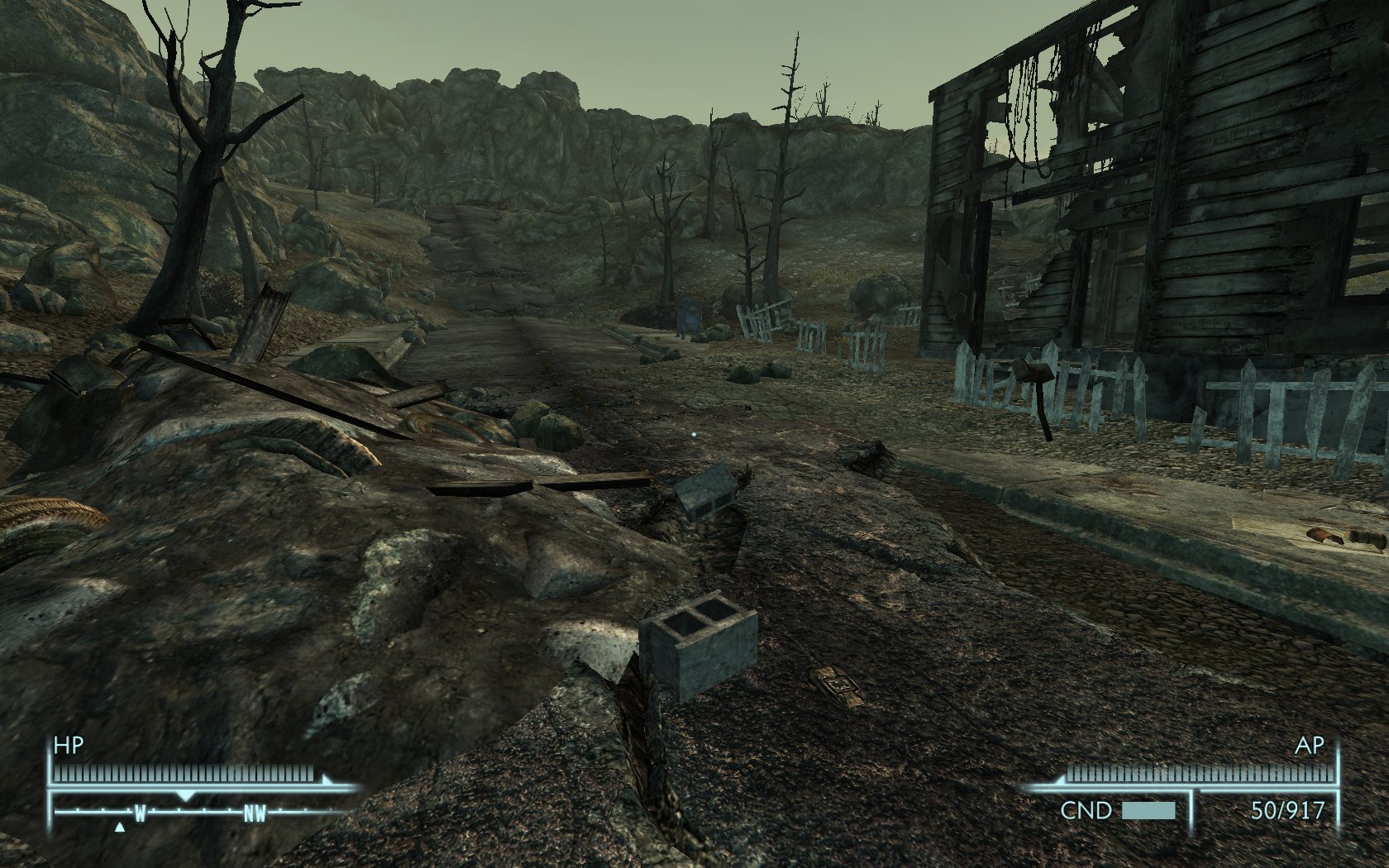
Replaces landscape/ terrain textures and bumpmaps for FALLOUT 3.
The default game textures and bumpmaps and have a typical resolution of 512x512 pixels. These textures have all been replaced with real-world photograph-based equivalent textures, and you can choose 3 different resolutions to suit your PC.
Includes:
* 2048x2048 pixels (400% larger, Most detailed)
* 1024x1024 pixels (200% larger, Detailed)
* 512x512 pixels
* Shinier Roads Patch
* Tree Roots Patch
*ROCKS ADDON PACK NOW AVAILABLE HERE:
http://modsreloaded.com/terrain-pack-rocks-addon
_____________________________________________________________
Notes:
The higher resolution packs may cause increased VRAM usage and therefore page-file swapping/ hard drive 'texture thrashing' and (due to increased memory usage) may cause some in-game stuttering/ lag or slow-downs. This will depend on your PC, CPU, RAM and graphics card. (None of this will harm your PC, just make it sweat a bit!)
But its not all bad news as the higher resolution packs will allow you to reduce the number of 'samples' (Anistropic Filtering) you need to use! Reduce these in the options section of the initial splash-screen game-loader. This will signicantly reduce VRAM usage and may smooth things out for you. (I use x2, reduced from x8)
______________________________________________________________
Installation:
Unpack the 7zip file once downloaded you will see 2 new files.
Place the new 7zip file in your Fallout 3 folder and extract the file. The files will be written to the necessary folder.
The other file (ArchiveInvalidation .txt) contains the strings to enable the preferential use of these textures over the default ones.
Simply add the text into your own archive invalidation file, found in your Fallout 3 folder, or simply place the file there if it does not already exist.
ROOTS REPLACEMENT PATCH: Once you have unpacked the dds file, place it in your Bethesda SoftworksFallout 3DataTexturesLandscape folder, overwriting the existing file
FIRST MOD?
Replace the following line in your Fallout.ini file:
Navigate to "My Documents", then "My Games" then "Fallout3" folder. Open the "Fallout.ini" (with notepad program) press ctrl+f and search for :
"bInvalidateOlderFiles=0", change the "0" to "1" and save.
NEW ALTERNATIVE METHOD:
VERY recommended, and props to the author of this idea, SplitSoul
(read in full here: http://forums.somethingawful.com/showthread.php?threadid=2998807)
How to install mods:
If the mod you wish to install isn't simply an .esp but contains skins or the like, you will need to tell the game to invalidate the original files in the .bsa archives and use these instead. You used to have to mess with ArchiveInvalidation.txt, but not anymore!
Simply download ArchiveInvalidation Invalidated ( http://www.tesnexus.com/downloads/file.php?id=10724) and do the following:
1) Delete ArchiveInvalidation.txt from your Data folder if it exists.
2) Extract ArchiveInvalidationInvalidated!.bsa to your Data folder.
3) Open up FALLOUT.ini in My DocumentsMy GamesFallout 3, find the SArchiveList= line, and add ArchiveInvalidationInvalidated!.bsa before everything else, so it looks something like this:
SArchiveList=ArchiveInvalidationInvalidated!.bsa, Fallout - Textures.bsa, Fallout - Meshes.bsa, Fallout - Voices.bsa, Fallout - Sound.bsa, Fallout - MenuVoices.bsa, Fallout - Misc.bsa"
Job Done- Thanks to SplitSoul!
_____________________________________________________________
Uninstallation:
Remove the 'landscape' folder in your data/ textures folder, and remove the corresponding archive invalidation lines you added earlier.
______________________________________________________________
Copyright/ Legal:
I would like this to remain a mod on its own and not to be included as part of other mods. This is due to the fact that it is the first part of a possible ongoing project and is subject to change, plus the overall size of the proposed package will be very large. Thanks.
Terrain pack
Downloads offline
Replaces landscape/ terrain textures and bumpmaps for FALLOUT 3.
The default game textures and bumpmaps and have a typical resolution of 512x512 pixels. These textures have all been replaced with real-world photograph-based equivalent textures, and you can choose 3 different resolutions to suit your PC.
Includes:
* 2048x2048 pixels (400% larger, Most detailed)
* 1024x1024 pixels (200% larger, Detailed)
* 512x512 pixels
* Shinier Roads Patch
* Tree Roots Patch
*ROCKS ADDON PACK NOW AVAILABLE HERE:
http://modsreloaded.com/terrain-pack-rocks-addon
_____________________________________________________________
Notes:
The higher resolution packs may cause increased VRAM usage and therefore page-file swapping/ hard drive 'texture thrashing' and (due to increased memory usage) may cause some in-game stuttering/ lag or slow-downs. This will depend on your PC, CPU, RAM and graphics card. (None of this will harm your PC, just make it sweat a bit!)
But its not all bad news as the higher resolution packs will allow you to reduce the number of 'samples' (Anistropic Filtering) you need to use! Reduce these in the options section of the initial splash-screen game-loader. This will signicantly reduce VRAM usage and may smooth things out for you. (I use x2, reduced from x8)
______________________________________________________________
Installation:
Unpack the 7zip file once downloaded you will see 2 new files.
Place the new 7zip file in your Fallout 3 folder and extract the file. The files will be written to the necessary folder.
The other file (ArchiveInvalidation .txt) contains the strings to enable the preferential use of these textures over the default ones.
Simply add the text into your own archive invalidation file, found in your Fallout 3 folder, or simply place the file there if it does not already exist.
ROOTS REPLACEMENT PATCH: Once you have unpacked the dds file, place it in your Bethesda SoftworksFallout 3DataTexturesLandscape folder, overwriting the existing file
FIRST MOD?
Replace the following line in your Fallout.ini file:
Navigate to "My Documents", then "My Games" then "Fallout3" folder. Open the "Fallout.ini" (with notepad program) press ctrl+f and search for :
"bInvalidateOlderFiles=0", change the "0" to "1" and save.
NEW ALTERNATIVE METHOD:
VERY recommended, and props to the author of this idea, SplitSoul
(read in full here: http://forums.somethingawful.com/showthread.php?threadid=2998807)
How to install mods:
If the mod you wish to install isn't simply an .esp but contains skins or the like, you will need to tell the game to invalidate the original files in the .bsa archives and use these instead. You used to have to mess with ArchiveInvalidation.txt, but not anymore!
Simply download ArchiveInvalidation Invalidated ( http://www.tesnexus.com/downloads/file.php?id=10724) and do the following:
1) Delete ArchiveInvalidation.txt from your Data folder if it exists.
2) Extract ArchiveInvalidationInvalidated!.bsa to your Data folder.
3) Open up FALLOUT.ini in My DocumentsMy GamesFallout 3, find the SArchiveList= line, and add ArchiveInvalidationInvalidated!.bsa before everything else, so it looks something like this:
SArchiveList=ArchiveInvalidationInvalidated!.bsa, Fallout - Textures.bsa, Fallout - Meshes.bsa, Fallout - Voices.bsa, Fallout - Sound.bsa, Fallout - MenuVoices.bsa, Fallout - Misc.bsa"
Job Done- Thanks to SplitSoul!
_____________________________________________________________
Uninstallation:
Remove the 'landscape' folder in your data/ textures folder, and remove the corresponding archive invalidation lines you added earlier.
______________________________________________________________
Copyright/ Legal:
I would like this to remain a mod on its own and not to be included as part of other mods. This is due to the fact that it is the first part of a possible ongoing project and is subject to change, plus the overall size of the proposed package will be very large. Thanks.
top