-
-
Downloads offline
Downloads: 169
File Size: 778999
Version: 4.0beta4
Author: ckknight
-
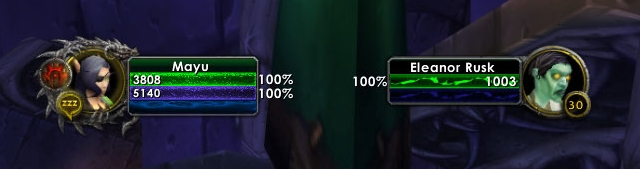
PitBull4 Unit Frames
by ckknight, Shefki, Stanzilla, Trillianne, vangual, sylvanshadows
PitBull4 is a continuation of PitBull.
It is currently experimental.
Differences from PitBull 3:
It's mostly done, but not entirely done.
Documentation is written before functions
Much easier for third-party extensions.
Options will be much, much simpler. In 3.0, there's about 200 panels that you can mess with, it's overwhelming. I want to bring this down to somewhere around 10.
Layouts are defined deterministically and unit groups use the layout rather than ad-hoc layouts on a per-unit basis. This will make setting up your unit frames far, far easier.
Due to some decisions made, 4.0 is actually more configurable than 3.0. As a layout designer, you will have a lot more control over how things look. You can have different fonts on the same frame, different textures, more precise positioning, and a whole slough of other things.
CPU Efficiency will be taken much more seriously.
It uses Ace3 instead of Rock.
FAQ
Guide
If you want to help localize PitBull in your language, go to http://www.wowace.com/projects/pitbull4/localization/.
Forum thread
Installation Guide
1.: Exit "World of Warcraft" completely
2.: Download the mod you want to install
-Make a folder on your desktop called "My Mods"
-Save the .zip/.rar files to this folder.
-If, when you try to download the file, it automatically "opens" it... you need to RIGHT click on the link and "save as..." or "Save Target As".
3.: Extract the file - commonly known as 'unzipping'
Do this ONE FILE AT A TIME!
-Windows
-Windows XP has a built in ZIP extractor. Double click on the file to open it, inside should be the file or folders needed. Copy these outside to the
"My Mods" folder.
-WinRAR: Right click the file, select "Extract Here"
-WinZip: You MUST make sure the option to "Use Folder Names" is CHECKED or it will just extract the files and not make the proper folders how
the Authors designed
-Mac Users
-StuffitExpander: Double click the archive to extract it to a folder in the current directory.
4.: Verify your WoW Installation Path
That is where you are running WoW from and THAT is where you need to install your mods.
5.: Move to the Addon folder
-Open your World of Warcraft folder. (default is C:Program FilesWorld of Warcraft)
-Go into the "Interface" folder.
-Go into the "AddOns" folder.
-In a new window, open the "My Mods" folder.
-The "My Mods" folder should have the "Addonname" folder in it.
-Move the "Addonname" folder into the "AddOns" folder
6.: Start World of Warcraft
7.: Make sure AddOns are installed
-Log in
-At the Character Select screen, look in lower left corner for the "addons" button.
-If button is there: make sure all the mods you installed are listed and make sure "load out of date addons" is checked.
-If the button is NOT there: means you did not install the addons properly. Look at the above screenshots. Try repeating the steps or getting
someone who knows more about computers than you do to help.
Translations
When you download a mod, please be sure that the mod is compatible with your translation of wow. Some mods only work on the US versions, while some only work on some of the various European versions. These variations are called "Localizations".
TOC Numbers (Out of Date Mods)
When Blizzard patches WoW, they change the Interface number. This means that all mods will be "out of date" unless or until the author releases a new version for that interface. Some people go into the .toc files and update the numbers themselves, but this is STRONGLY advised against as it will cause problems locating possible incompatibilities addons. When you log into WoW after a patch, you DO NOT have to delete your interface directory. All you have to do is simply tell WoW to ignore the interface numbers and load all the mods anyway. All you have to do is, while at the "character select" screen, look in the lower left corner and click on the "addons" button. A window will pop up listing all your installed mods.
If you look in the upper left corner of that window there should be a box that says "Load Out of Date AddOns". You want to CHECK this box. Now simply go into WoW normally and all your mods should load. As of the 1.9 patch, you will have to do this after EVERY patch/update that Blizzard posts! If you encounter any problems with a mod after a patch, please be sure to let the author of the mod know so they can fix it.
See also: About "Out Of Date AddOns"
Mac Support
WoW addons are not platformed based. As such, they can be used on either Mac or PC. You can extract both .zip and .rar files on a Mac using StuffitExpander.
Directory Structure
World of Warcraft
|_ Interface
|_AddOns
|_*AddonName*
|_ *AddonName*.toc
|_ *AddonName*.xml
|_ *AddonName*.lua
|_ (possibly others as well)...
PitBull Unit Frames 4.0
Downloads offline
PitBull4 Unit Frames
by ckknight, Shefki, Stanzilla, Trillianne, vangual, sylvanshadows
PitBull4 is a continuation of PitBull.
It is currently experimental.
Differences from PitBull 3:
It's mostly done, but not entirely done.
Documentation is written before functions
Much easier for third-party extensions.
Options will be much, much simpler. In 3.0, there's about 200 panels that you can mess with, it's overwhelming. I want to bring this down to somewhere around 10.
Layouts are defined deterministically and unit groups use the layout rather than ad-hoc layouts on a per-unit basis. This will make setting up your unit frames far, far easier.
Due to some decisions made, 4.0 is actually more configurable than 3.0. As a layout designer, you will have a lot more control over how things look. You can have different fonts on the same frame, different textures, more precise positioning, and a whole slough of other things.
CPU Efficiency will be taken much more seriously.
It uses Ace3 instead of Rock.
FAQ
Guide
If you want to help localize PitBull in your language, go to http://www.wowace.com/projects/pitbull4/localization/.
Forum thread
Installation Guide
1.: Exit "World of Warcraft" completely
2.: Download the mod you want to install
-Make a folder on your desktop called "My Mods"
-Save the .zip/.rar files to this folder.
-If, when you try to download the file, it automatically "opens" it... you need to RIGHT click on the link and "save as..." or "Save Target As".
3.: Extract the file - commonly known as 'unzipping'
Do this ONE FILE AT A TIME!
-Windows
-Windows XP has a built in ZIP extractor. Double click on the file to open it, inside should be the file or folders needed. Copy these outside to the
"My Mods" folder.
-WinRAR: Right click the file, select "Extract Here"
-WinZip: You MUST make sure the option to "Use Folder Names" is CHECKED or it will just extract the files and not make the proper folders how
the Authors designed
-Mac Users
-StuffitExpander: Double click the archive to extract it to a folder in the current directory.
4.: Verify your WoW Installation Path
That is where you are running WoW from and THAT is where you need to install your mods.
5.: Move to the Addon folder
-Open your World of Warcraft folder. (default is C:Program FilesWorld of Warcraft)
-Go into the "Interface" folder.
-Go into the "AddOns" folder.
-In a new window, open the "My Mods" folder.
-The "My Mods" folder should have the "Addonname" folder in it.
-Move the "Addonname" folder into the "AddOns" folder
6.: Start World of Warcraft
7.: Make sure AddOns are installed
-Log in
-At the Character Select screen, look in lower left corner for the "addons" button.
-If button is there: make sure all the mods you installed are listed and make sure "load out of date addons" is checked.
-If the button is NOT there: means you did not install the addons properly. Look at the above screenshots. Try repeating the steps or getting
someone who knows more about computers than you do to help.
Translations
When you download a mod, please be sure that the mod is compatible with your translation of wow. Some mods only work on the US versions, while some only work on some of the various European versions. These variations are called "Localizations".
TOC Numbers (Out of Date Mods)
When Blizzard patches WoW, they change the Interface number. This means that all mods will be "out of date" unless or until the author releases a new version for that interface. Some people go into the .toc files and update the numbers themselves, but this is STRONGLY advised against as it will cause problems locating possible incompatibilities addons. When you log into WoW after a patch, you DO NOT have to delete your interface directory. All you have to do is simply tell WoW to ignore the interface numbers and load all the mods anyway. All you have to do is, while at the "character select" screen, look in the lower left corner and click on the "addons" button. A window will pop up listing all your installed mods.
If you look in the upper left corner of that window there should be a box that says "Load Out of Date AddOns". You want to CHECK this box. Now simply go into WoW normally and all your mods should load. As of the 1.9 patch, you will have to do this after EVERY patch/update that Blizzard posts! If you encounter any problems with a mod after a patch, please be sure to let the author of the mod know so they can fix it.
See also: About "Out Of Date AddOns"
Mac Support
WoW addons are not platformed based. As such, they can be used on either Mac or PC. You can extract both .zip and .rar files on a Mac using StuffitExpander.
Directory Structure
World of Warcraft
|_ Interface
|_AddOns
|_*AddonName*
|_ *AddonName*.toc
|_ *AddonName*.xml
|_ *AddonName*.lua
|_ (possibly others as well)...
top