-
-
Downloads offline
Downloads: 301
File Size: 25263
Version: 1.1b
Author: FuzzySlash
-
----------------
VERSION 1.1b
----------------
-More FPS (from V1.1a)
-V1.1b: Indoor optimization ESPs have better FPS in exterior cells (Outdoors).
Details of files:
-------------
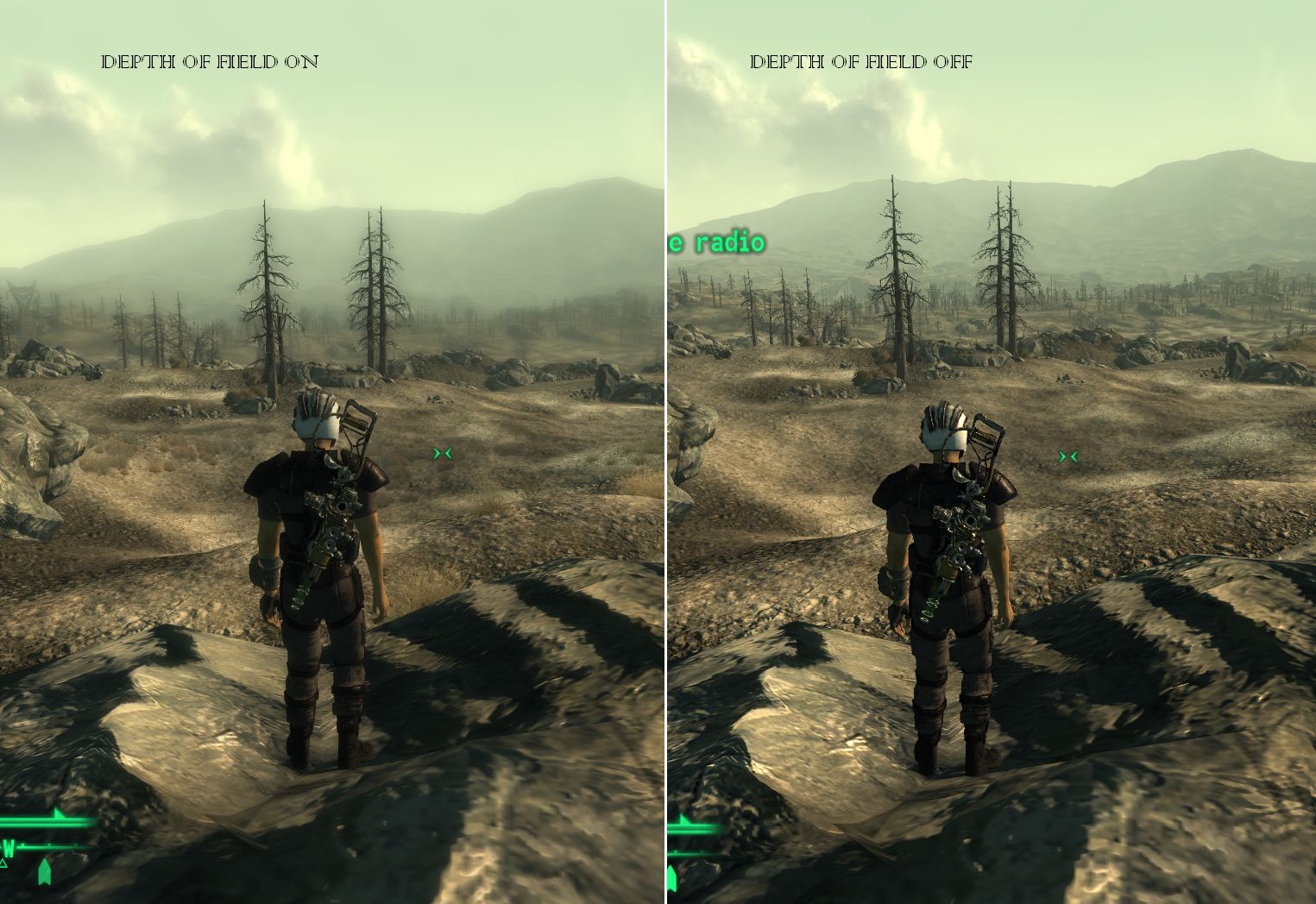
DEPTH OF FIELD
-------------
5 different levels of strength, going upwards:
-Subtle
-Medium
-Strong
-Extreme
-Insane
3 different levels of distance:
-Close
-Far
-Very Far
2 different folders:
-Without Indoor Optimization:
This contains the files that do not change or turn off the DOF effect in interiors in any way,
only recommended for PCs that don't get a slow down because of the effect indoors, you will have to test that yourself.
-With Indoor Optimization (RECOMMENDED)
This completely turns off the DOF effect indoors, speeding up FPS.
NOTE: Insane Esps are not intended to work perfectly, no complaining if you see a visual glitch!
-------------
MOTION BLUR
-------------
5 different levels of strength, going upwards:
-Subtle
-Medium
-Strong
-Extreme
-Insane
That's it. They have been optimized and should NOT reduced FPS by more than 1-2, if any...
-------------
INSTRUCTIONS
-------------
Installation:
1.Open the .rar file you downloaded
2.Drag, or extract the file you would like to use to your data folder(you can also extract all of them, and then pick one later).
3.Repeat with other .rar file if you downloaded one.
4.Open Fallout 3 Launcher, or FOMM, go to Data Files, and tick the checkbox next to the 2 files you choose.
5.Run the game...
Uninstallation:
Either-
1.Uncheck the 2 files you chose in Data Files
OR
2.Go to your data folder, usually C:Program FilesBethesda softworksFallout 3Data and delete the 2 files you chose before.
--------------
INCOMPATIBILITY
--------------
-Motion Blur-
None.
-Depth Of Field-
StapleNinja's DOF(Why would you combine them?)
--------------
FUTURE PLANS IN ORDER
--------------
-Option to automatically turn off Motion Blur indoors (just in case)
-Optional file:
-Drug Effects-
Visuals activate when taking certain drugs, i.e. More saturation for Jet, Inverted(Almost) colours for Psycho, Double Vision for any alcohol, etc.
-Include a menu, for only 1 ESP file
-------------------
CHANGELOG
-------------------
V1.1b:
-Interior optimization ESPS (in the folder Depth of Field-With Indoor Optimization) should no longer be slower than the other ESPs outdoors (Depth of Field-WithOUT Indoor Optimization). I FULLY recommend these.
V1.1:
-Subtle Motion Blur FPS Drop Fixed (If other Motion Blur files gave you any slowdowns then these are fixed too).
-Depth Of Field With no Indoor optimization now available, for people where it runs smooth indoors anyways.
-Motion blur option Insane added.
-Motion blur reduced in general.
-New Optional file added:-V.A.T.S. DOF effect.
-There should be less FPS redcution!
V1.0:
-Distances Adjusted correctly.
-Added Insane option for DOF. Causes graphical anomalies!
0.75 Beta:
-Depth of Field effect is turned off when the player is in interior cells.
-Effect slightly optimized, though difference is not great.
0.5 Beta: First release.
Motion Blur and Depth of Field Modular
Downloads offline
----------------
VERSION 1.1b
----------------
-More FPS (from V1.1a)
-V1.1b: Indoor optimization ESPs have better FPS in exterior cells (Outdoors).
Details of files:
-------------
DEPTH OF FIELD
-------------
5 different levels of strength, going upwards:
-Subtle
-Medium
-Strong
-Extreme
-Insane
3 different levels of distance:
-Close
-Far
-Very Far
2 different folders:
-Without Indoor Optimization:
This contains the files that do not change or turn off the DOF effect in interiors in any way,
only recommended for PCs that don't get a slow down because of the effect indoors, you will have to test that yourself.
-With Indoor Optimization (RECOMMENDED)
This completely turns off the DOF effect indoors, speeding up FPS.
NOTE: Insane Esps are not intended to work perfectly, no complaining if you see a visual glitch!
-------------
MOTION BLUR
-------------
5 different levels of strength, going upwards:
-Subtle
-Medium
-Strong
-Extreme
-Insane
That's it. They have been optimized and should NOT reduced FPS by more than 1-2, if any...
-------------
INSTRUCTIONS
-------------
Installation:
1.Open the .rar file you downloaded
2.Drag, or extract the file you would like to use to your data folder(you can also extract all of them, and then pick one later).
3.Repeat with other .rar file if you downloaded one.
4.Open Fallout 3 Launcher, or FOMM, go to Data Files, and tick the checkbox next to the 2 files you choose.
5.Run the game...
Uninstallation:
Either-
1.Uncheck the 2 files you chose in Data Files
OR
2.Go to your data folder, usually C:Program FilesBethesda softworksFallout 3Data and delete the 2 files you chose before.
--------------
INCOMPATIBILITY
--------------
-Motion Blur-
None.
-Depth Of Field-
StapleNinja's DOF(Why would you combine them?)
--------------
FUTURE PLANS IN ORDER
--------------
-Option to automatically turn off Motion Blur indoors (just in case)
-Optional file:
-Drug Effects-
Visuals activate when taking certain drugs, i.e. More saturation for Jet, Inverted(Almost) colours for Psycho, Double Vision for any alcohol, etc.
-Include a menu, for only 1 ESP file
-------------------
CHANGELOG
-------------------
V1.1b:
-Interior optimization ESPS (in the folder Depth of Field-With Indoor Optimization) should no longer be slower than the other ESPs outdoors (Depth of Field-WithOUT Indoor Optimization). I FULLY recommend these.
V1.1:
-Subtle Motion Blur FPS Drop Fixed (If other Motion Blur files gave you any slowdowns then these are fixed too).
-Depth Of Field With no Indoor optimization now available, for people where it runs smooth indoors anyways.
-Motion blur option Insane added.
-Motion blur reduced in general.
-New Optional file added:-V.A.T.S. DOF effect.
-There should be less FPS redcution!
V1.0:
-Distances Adjusted correctly.
-Added Insane option for DOF. Causes graphical anomalies!
0.75 Beta:
-Depth of Field effect is turned off when the player is in interior cells.
-Effect slightly optimized, though difference is not great.
0.5 Beta: First release.
top