Jetpack Mod
Jetpack.esp
This mod requires the latest version of NVSE (currently v1.0 beta 4)
You can download FOSE here http://modsreloaded.com/fose
Intro
This is a beta release. The code is just pulled from my Fallout 3 jetpack mod with no quest added. The jetpack will be added automatically when you start the mod.
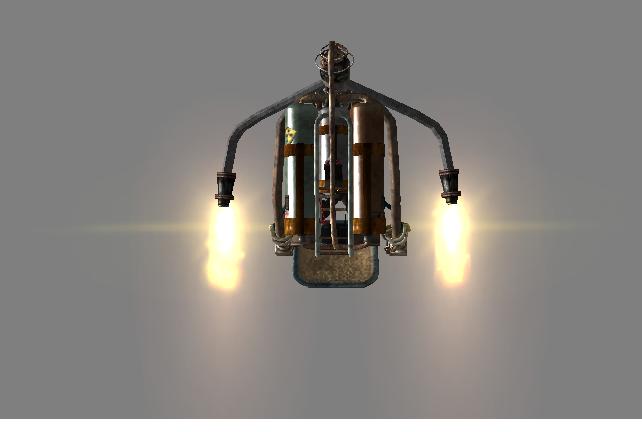
This mod adds a working jetpack that will allow you to fly in exterior cells. The jetpack uses flamer fuel at a rate of about 2 units per second while thrusting in any direction, and 1 unit per second while idle.
Instructions
With the jetpack equipped pressing the grab button and jump button at the same time will start you flying. Then just use the directional controls and mouse to move along the X/Y axis. Pressing jump will increase altitude, and sneak will lower altitude. The use button will turn the jetpack off so make sure you are close to the ground when pressing it.
When the jetpack is in flight mode the controls forward, back, left, right, jump, and sneak will be unbound. This is to prevent the normal animations from playing while flying. Those controls are restored if you die while flying, or if you stop flying using the use button.
It is recommended not to save while flying as the unbound controls will be saved that way and if you load another save where you are not flying you will have to rebind those controls.
At this point there is no collision with objects while flying. The controls offer pretty precise handling so avoiding objects should not be a problem.
Pressing the grab button while flying will display the amount of fuel left.
When the fuel gets below 50 units the fuel display will turn red. If the fuel drops below 30 units the fuel display will flash on and off and an alarm will sound every 4 seconds until the jetpack is shut down, or runs out of fuel.
The fuel and speed display can be positioned where you want it. Hold down the run key until the normal HUD elements disappear, then while still holding the run button use the arrow keys to reposition the display. When it is where you like it release the run key.
-----------
Known Issues
-----------
This game obviously wasn't designed with flying in mind, so some buildings don't have collision on their roof tops, and some are missing the roof completely. There are also a number of areas that aren't meant for the player to see. Flying out of or into a world space like Megaton will put you in an area that is not designed for gameplay. Same for most of downtown DC.
When using the grab key to carry the jetpack it rotates. This may be fixed in a future update.
The jetpack uses the add-on slot 1, and the flames use the backpack slot so may not work right with other items equipped that use the same slots.
------
Credits
------
VaiN (aka NDG474) - jetpack model and textures
Contact VaiN at the following link if you want to use his mesh http://www.fallout3nexus.com/downloads/file.php?id=12553
Bonedog - Edit of the jetpack model and textures to correct issues with them not displaying properly
Imp of the Perverse - Jetpack fuel, and speed HUD display. b3jetpackHUDquest script.
weijiesen - Created the flame nif for the jetpack
Ghogiel - Re-rigged and opitimzed the jetpack nif and cut the file size by 20%
Added dismemberment to the jetpack nif
Set up collision and havok for the jetpack ground model
Fixed numerous issues with the jetpack inclucing the harness clipping (should work with most armors now) Corrected the alpha transparencys on the jetpack labels
Exhaust pipes are now rounded properly
Re-aligned the flame FX to properly display in game.
-------------
Installation
-------------
Extract the contents of this archive to the Fallout New Vegas folder. Select the Jetpack.esp in the data files section, and launch the game.
Specific instructions for the HUD elements. If you don't use a UI mod then you don't need to do anything other than install this mod. However if you are usind DarNified UI F3, for instance, you will need to check for the file
"hud_main_menu.xml"
in the
"DataMenusmain"
folder. If that file is there then you should delete the one from this archive before installing to prevent it overwriting you existing HUD mods.
Then add this line
to your
"hud_main_menu"
file found in the
"DataMenusmain"
folder, before the last line
"".
That file can be opened with note pad to allow editing.
More specific install instructions from Imp of the Perverse concerning the HUD elements.
1) Navigate to "Fallout New VegasDatamenusmain", and check to see if hud_main_menu.xml is there.
2a) If it is not, or if that folder does not exist, paste both the .esp file and "menus" folder in this mod's data directory into your data directory, as with any other mod. Check the .esp in a mod manager, and you're done.
2b) If it is there, open it up using a text editor. Scroll to the bottom, and just above the last line, add:
The last two lines will then look like:
3) Paste the folder "menuprefabsXXXX" from this .7z into your data directory, maintaining that file path.
4) Paste the .esp into your data directory, check it in a mod manager, and you're done.
Once installed, check to make sure any further mods you install do not overwrite hud_main_menu.xml. If they do, re-add the "include" line once the file has been overwritten. If you're not sure, check (it should be pretty apparent, the hud counters will disappear the next time you play the game).
Jetpack Mod
Downloads offline
Jetpack Mod
Jetpack.esp
This mod requires the latest version of NVSE (currently v1.0 beta 4)
You can download FOSE here http://modsreloaded.com/fose
Intro
This is a beta release. The code is just pulled from my Fallout 3 jetpack mod with no quest added. The jetpack will be added automatically when you start the mod.
This mod adds a working jetpack that will allow you to fly in exterior cells. The jetpack uses flamer fuel at a rate of about 2 units per second while thrusting in any direction, and 1 unit per second while idle.
Instructions
With the jetpack equipped pressing the grab button and jump button at the same time will start you flying. Then just use the directional controls and mouse to move along the X/Y axis. Pressing jump will increase altitude, and sneak will lower altitude. The use button will turn the jetpack off so make sure you are close to the ground when pressing it.
When the jetpack is in flight mode the controls forward, back, left, right, jump, and sneak will be unbound. This is to prevent the normal animations from playing while flying. Those controls are restored if you die while flying, or if you stop flying using the use button.
It is recommended not to save while flying as the unbound controls will be saved that way and if you load another save where you are not flying you will have to rebind those controls.
At this point there is no collision with objects while flying. The controls offer pretty precise handling so avoiding objects should not be a problem.
Pressing the grab button while flying will display the amount of fuel left.
When the fuel gets below 50 units the fuel display will turn red. If the fuel drops below 30 units the fuel display will flash on and off and an alarm will sound every 4 seconds until the jetpack is shut down, or runs out of fuel.
The fuel and speed display can be positioned where you want it. Hold down the run key until the normal HUD elements disappear, then while still holding the run button use the arrow keys to reposition the display. When it is where you like it release the run key.
-----------
Known Issues
-----------
This game obviously wasn't designed with flying in mind, so some buildings don't have collision on their roof tops, and some are missing the roof completely. There are also a number of areas that aren't meant for the player to see. Flying out of or into a world space like Megaton will put you in an area that is not designed for gameplay. Same for most of downtown DC.
When using the grab key to carry the jetpack it rotates. This may be fixed in a future update.
The jetpack uses the add-on slot 1, and the flames use the backpack slot so may not work right with other items equipped that use the same slots.
------
Credits
------
VaiN (aka NDG474) - jetpack model and textures
Contact VaiN at the following link if you want to use his mesh http://www.fallout3nexus.com/downloads/file.php?id=12553
Bonedog - Edit of the jetpack model and textures to correct issues with them not displaying properly
Imp of the Perverse - Jetpack fuel, and speed HUD display. b3jetpackHUDquest script.
weijiesen - Created the flame nif for the jetpack
Ghogiel - Re-rigged and opitimzed the jetpack nif and cut the file size by 20%
Added dismemberment to the jetpack nif
Set up collision and havok for the jetpack ground model
Fixed numerous issues with the jetpack inclucing the harness clipping (should work with most armors now) Corrected the alpha transparencys on the jetpack labels
Exhaust pipes are now rounded properly
Re-aligned the flame FX to properly display in game.
-------------
Installation
-------------
Extract the contents of this archive to the Fallout New Vegas folder. Select the Jetpack.esp in the data files section, and launch the game.
Specific instructions for the HUD elements. If you don't use a UI mod then you don't need to do anything other than install this mod. However if you are usind DarNified UI F3, for instance, you will need to check for the file
"hud_main_menu.xml"
in the
"DataMenusmain"
folder. If that file is there then you should delete the one from this archive before installing to prevent it overwriting you existing HUD mods.
Then add this line
to your
"hud_main_menu"
file found in the
"DataMenusmain"
folder, before the last line
"".
That file can be opened with note pad to allow editing.
More specific install instructions from Imp of the Perverse concerning the HUD elements.
1) Navigate to "Fallout New VegasDatamenusmain", and check to see if hud_main_menu.xml is there.
2a) If it is not, or if that folder does not exist, paste both the .esp file and "menus" folder in this mod's data directory into your data directory, as with any other mod. Check the .esp in a mod manager, and you're done.
2b) If it is there, open it up using a text editor. Scroll to the bottom, and just above the last line, add:
The last two lines will then look like:
3) Paste the folder "menuprefabsXXXX" from this .7z into your data directory, maintaining that file path.
4) Paste the .esp into your data directory, check it in a mod manager, and you're done.
Once installed, check to make sure any further mods you install do not overwrite hud_main_menu.xml. If they do, re-add the "include" line once the file has been overwritten. If you're not sure, check (it should be pretty apparent, the hud counters will disappear the next time you play the game).
top