-
-
Downloads offline
Downloads: 1509
File Size: 1312222
Version: 2.0
Author: Pumbars
-
==================================================================
High quality lights mod v 2.0
==================================================================
1. About the authors and the mod
2. Installation
3. FAQ
4. Some info for other modelers.
==================================================================
About the mod.
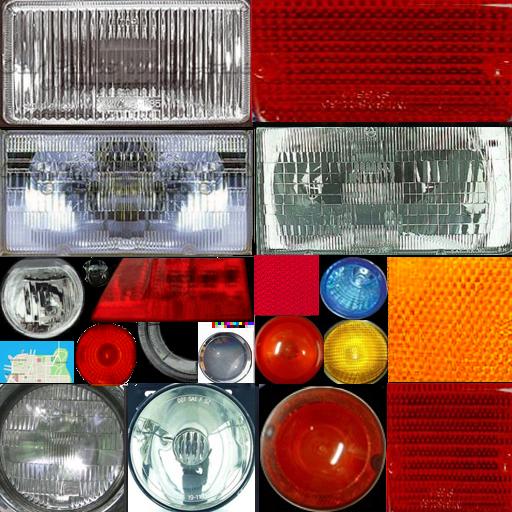
The idea of creating the mod came up together with the possibility of looking through the San Andreas textures. There is a nice feature in the new GTA: lights are on! It turned out, that there are two textures responsible for this, both from models\generic\vehicle.txd (one for lights off and another guess :))
Quite a poor condition of the lights made us to create the modification to improve this. There was a thread created on the worlds biggest forum on GTA (gta.com.ua/forum2/) with the idea; and for about three months the mod was getting better end better, according to the tastes of various GTA users. As a result you got this :)
Mod features (some of the functions available only with the models created by the teams which use this mod)
Except for improving the basic lights, we have added xenon lights into the game, as well as some neon, as well as the lighting inside the car, as well as GPS, as well as BMW angel eyes, as well as
(well, cmon, were not going to put all the list here; in that case readme would weight more than the mod itself ;)
==================================================================
Authors:
Pumbars - pumbars [at] list [dot] ru, spc.gta.com.ua
Slayer - SlayerStrikers@mail [dot] ru, gta-customs.com.ru
Spit811 - thespit [at] mail [dot] ru, spc.gta.com.ua
DenX
Torzer - torzer [at] gmail [dot] com, spc.gta.com.ua
Andrey P.
Readme kindly translated by eXigy - flicker [at] gamemail [dot] ru
==================================================================
Mod installation.
Method 1. Automatically
If you did NOTHING with models\generic\vehicle.txd (e.g., didnt
install specific mods etc), then just copy the file from our archive into folder models\generic\; youd get high-quality car plates and
SPC Wheel Pack v1.0 support.
Method 2. Manually
If you DID something with vehicle.txd, then installing manually is
strongly recommended.
All that you need for such a terribly difficult something is
TXD Workshop v3.5, downloadable here
http://gct.gta.com.ua/tools.htm
Alright, so firstly you have to open TXD Workshop v.3.5 and choose
File/Open in it
Then you have to open
\models\generic\vehicle.txd
Got the list of textures? Great. Then just find texture called "vehiclelights128" and click on it. Afterwards click Import and choose the off.bmp file (from our archive). The picture would change.
Do the same with "vehiclelights128": click on the texture, import, choose on.bmp from the archive this time.
Finally, dont forget to save it via File/Save. Vois la!
==================================================================
FAQ
Q: The program tells about the error when I save. What the
A :In that case, save the file via File/Save as
and save the file
in another place. Afterwards just cut and paste it into folder models\generic\
==================================================================
The mod is required for the correct work of automobiles by other teams (SPC, GTA-CUSTOMS, STC, FACTORY, AMC etc.)
Mod is NOT exclusive and may be distributed as is. Nevertheless, it is strictly forbidden to change the mod itself.
High quality lights
Downloads offline
==================================================================
High quality lights mod v 2.0
==================================================================
1. About the authors and the mod
2. Installation
3. FAQ
4. Some info for other modelers.
==================================================================
About the mod.
The idea of creating the mod came up together with the possibility of looking through the San Andreas textures. There is a nice feature in the new GTA: lights are on! It turned out, that there are two textures responsible for this, both from models\generic\vehicle.txd (one for lights off and another guess :))
Quite a poor condition of the lights made us to create the modification to improve this. There was a thread created on the worlds biggest forum on GTA (gta.com.ua/forum2/) with the idea; and for about three months the mod was getting better end better, according to the tastes of various GTA users. As a result you got this :)
Mod features (some of the functions available only with the models created by the teams which use this mod)
Except for improving the basic lights, we have added xenon lights into the game, as well as some neon, as well as the lighting inside the car, as well as GPS, as well as BMW angel eyes, as well as
(well, cmon, were not going to put all the list here; in that case readme would weight more than the mod itself ;)
==================================================================
Authors:
Pumbars - pumbars [at] list [dot] ru, spc.gta.com.ua
Slayer - SlayerStrikers@mail [dot] ru, gta-customs.com.ru
Spit811 - thespit [at] mail [dot] ru, spc.gta.com.ua
DenX
Torzer - torzer [at] gmail [dot] com, spc.gta.com.ua
Andrey P.
Readme kindly translated by eXigy - flicker [at] gamemail [dot] ru
==================================================================
Mod installation.
Method 1. Automatically
If you did NOTHING with models\generic\vehicle.txd (e.g., didnt
install specific mods etc), then just copy the file from our archive into folder models\generic\; youd get high-quality car plates and
SPC Wheel Pack v1.0 support.
Method 2. Manually
If you DID something with vehicle.txd, then installing manually is
strongly recommended.
All that you need for such a terribly difficult something is
TXD Workshop v3.5, downloadable here
http://gct.gta.com.ua/tools.htm
Alright, so firstly you have to open TXD Workshop v.3.5 and choose
File/Open in it
Then you have to open
\models\generic\vehicle.txd
Got the list of textures? Great. Then just find texture called "vehiclelights128" and click on it. Afterwards click Import and choose the off.bmp file (from our archive). The picture would change.
Do the same with "vehiclelights128": click on the texture, import, choose on.bmp from the archive this time.
Finally, dont forget to save it via File/Save. Vois la!
==================================================================
FAQ
Q: The program tells about the error when I save. What the
A :In that case, save the file via File/Save as
and save the file
in another place. Afterwards just cut and paste it into folder models\generic\
==================================================================
The mod is required for the correct work of automobiles by other teams (SPC, GTA-CUSTOMS, STC, FACTORY, AMC etc.)
Mod is NOT exclusive and may be distributed as is. Nevertheless, it is strictly forbidden to change the mod itself.
top