-
-
Downloads offline
Downloads: 538
File Size: 57388
Version: 1.6.0
Author: ShadauxCat
-
NOTE: This file requires (and will not work without) FOSE. Please make sure you have it before you ask me for help.
Additionally, if you have any UI mod installed that affects the HUD - ESPECIALLY if that mod is something other than Darnified UI or MTUI - it's heavily recommended you read the information under "Installation/Uninstallation" and "Compatibility."
Finally, for the MTUI and Darnified UI versions, please make sure you have the latest versions of each - you can get the latest Darnified UI here and the latest MTUI here
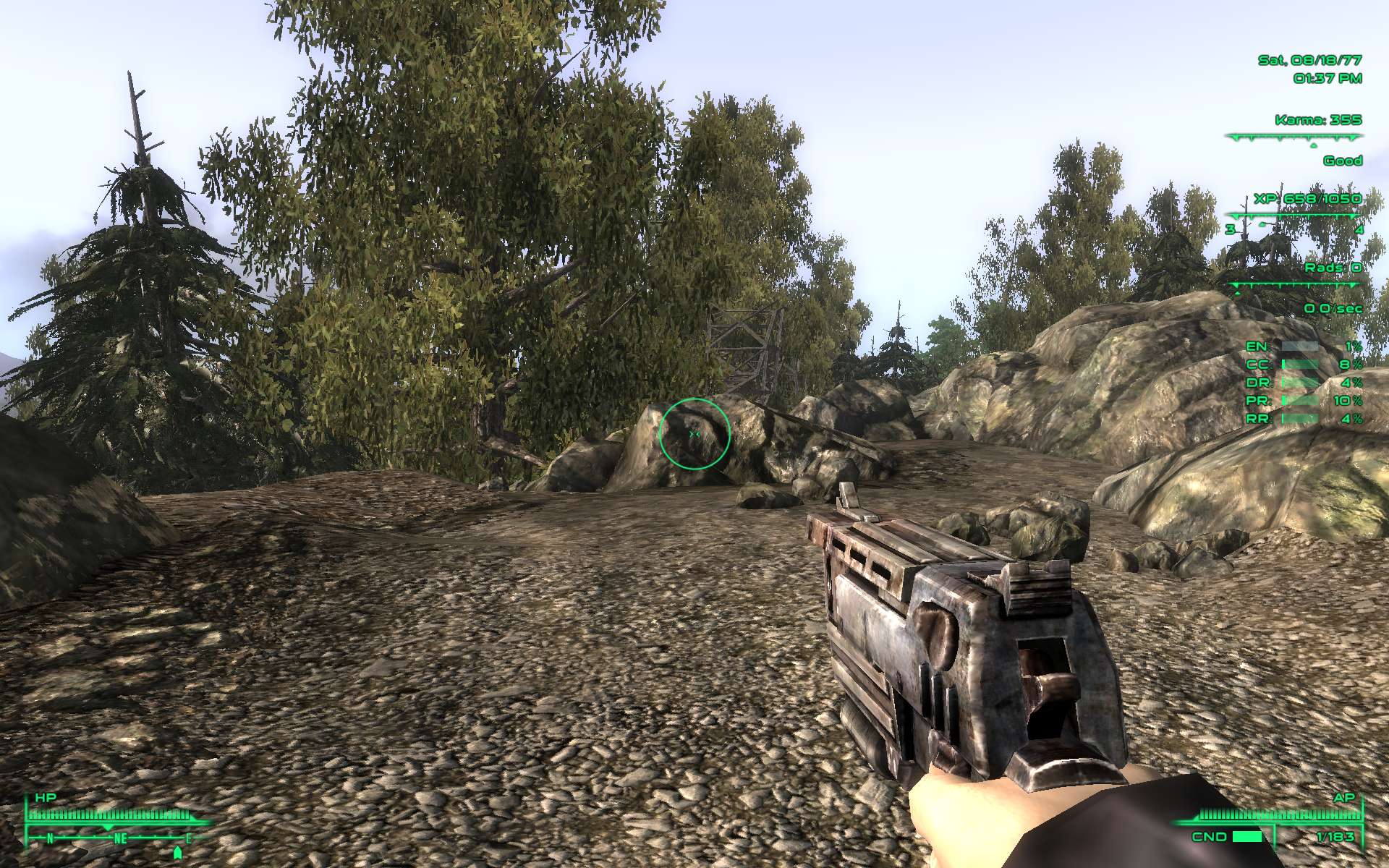
Dynamic Crosshair adds a dynamically resizing crosshair to Fallout 3, which grows and shrinks in real time to show your current weapon's accuracy.
As an aside, you may notice while looking at screenshots that there are no crouching or aiming shots at 100 big/small guns - that's because, at 100 big/small guns, crouching and aiming have no effect, so it seemed senseless to have four pictures of the same size crosshair.
All of the information below is available in the readme, which is bundled with the mod in .txt format, so you can read it at your leisure.
Please do NOT bundle this mod with yours. If you design a mod that works well with this, please link to it to ensure users always get the latest version. Additionally, if you wish to change this mod itself in any way, please read the information under "Credits and Permissions" in the box to the right.
Fallout 3
Dynamic Crosshair Mod
Version 1.5.0
by ShadauxCat
POWERED BY FOSE
by by Ian Patterson (ianpatt), Stephen Abel (behippo), and Paul Connelly (scruggsywuggsy the ferret)
http://fose.silverlock.org/
TABLE OF CONTENTS
1. Introduction
2. Description
3. Installation/Uninstallation
4. Compatibility
5. Contact
INTRODUCTION
Hey, look, I'm gonna do another lame introduction for absolutely no reason! Why do I do these? I don't know. I just told you there was no reason. So just get used to it already.
DESCRIPTION
The Dynamic Crosshair mod is simple: it adds a dynamically resizing crosshair (a la Mass Effect, S.T.A.L.K.E.R., and probably others) to Fallout 3. This crosshair shows you EXACTLY what your weapon's spread is. As you improve the weapon's relevant skill, you'll see the size of your crosshair gradually shrink, and you'll also be able to see the differences between the accuracy of various weapons. This can be very helpful in gameplay, especially when playing in third person.
The accuracy circle is a separate UI element from the crosshair, so you can use this with any crosshair mod you want! That means you can get the best of every world - you can see your accuracy without having to sacrifice that neat crosshair mod you downloaded!
The dynamic crosshair is also available as a cross rather than a circle, and can also be set to show up only during combat, only when aiming at a hostile target, only when using the iron sights (aim/block button), or any combination of the three, so as to be less intrusive outside of combat. These settings are available by activating the "Crosshair Settings" item in the armor section of your inventory.
for the best synergy with this mod, I recommend one of the following crosshair textures:
Better Crosshair - FPS Style by GTA44 (Recommended for circle setting only)
Smaller Crosshair by ziher (Either DotXhair or Larger DotXhair)
Rad Crosshair and Cursor by njforgacs
Vault-Tec Crosshair by Ryuu.densetsu (Either the cross or the dot version - Cross version recommended for circle setting only)
Of course, you're more than welcome to use any crosshair mod you like, or none at all. The Dynamic Crosshair will work just fine with all of them, including the vanilla crosshair. Some just may not look quite as nice.
Dynamic Crosshair requires FOSE to run. Without it, it will simply do nothing.
INSTALLATION/UNINSTALLATION
To install this mod, simply drop DynamicCrosshair.esp and the "menus" and "Textures" folder, into your base folder (Default C:Program FilesBethesda SoftworksFallout 3Data). If you have any UI mods, make sure you downloaded the right file before you install, as your HUD will be altered if you didn't - there are currently compatibility files for both Darnified UI and MTUI, which should be available from the same place as the vanilla download.
If you have a different UI mod or UI customizations that you'd like to keep, open up custom.xml and copy its contents into hud_main_menu.xml, right underneath ''. (You can put it somewhere else if you like for better organization, but make sure that it's not inside any other element - I, personally, put it below the ReticleCenter element, right after the beneath it.)
Once you've done that, simply make sure you have FOSE installed. This mod absolutely requires FOSE to function. Without FOSE, the mod will simply do nothing. (Unlike my Tactical Ammunition mod, it won't blow up your head, it'll simply refuse to work.) If you do not have FOSE, you can download it at http://fose.silverlock.org/.
To uninstall the mod, remove the installed files. If you have Darnified UI or MTUI, you may want to manually remove the AccuracyCircle element from hud_main_menu.xml or reinstall the default hud_main_menu.xml; however, without DynamicCrosshair.esp, this element won't do anything, so it's safe to leave it there. The same goes for the installed textures - without DynamicCrosshair.esp, they have no effect.
COMPATIBILITY
This mod is compatible with ANY other crosshair mod out there, but conflicts with any mod that changes the HUD. Compatibility files have been included for Darnified UI and MTUI, but any other UI mods will be incompatible. This can be fixed, however, with a small amount of manual editing (which you can do in under a minute) - see the Installation/Uninstallation section above for more info. Additionally, if you have an incompatible UI mod and would like a compatibility file released for it, rather than editing it yourself, just let me know and I'll put one out there for you.
This mod also works with ALL weapons, including mod-installed weapons.
I will also mention again here that this mod requires FOSE to work. Without it, you'll get the bundled crosshair image, but it will simply remain stationary and won't increase or decrease as is intended.
CONTACT
You can contact me through the Nexus Forums by private message here:
http://www.thenexusforums.com/index.php?app=members&module=messaging§ion=send&do=form&fromMemberID=1539730
or by email here:
http://www.thenexusforums.com/index.php?app=members&module=messaging§ion=contact&do=Mail&MID=1539730
Dynamic Crosshair
Downloads offline
NOTE: This file requires (and will not work without) FOSE. Please make sure you have it before you ask me for help.
Additionally, if you have any UI mod installed that affects the HUD - ESPECIALLY if that mod is something other than Darnified UI or MTUI - it's heavily recommended you read the information under "Installation/Uninstallation" and "Compatibility."
Finally, for the MTUI and Darnified UI versions, please make sure you have the latest versions of each - you can get the latest Darnified UI here and the latest MTUI here
Dynamic Crosshair adds a dynamically resizing crosshair to Fallout 3, which grows and shrinks in real time to show your current weapon's accuracy.
As an aside, you may notice while looking at screenshots that there are no crouching or aiming shots at 100 big/small guns - that's because, at 100 big/small guns, crouching and aiming have no effect, so it seemed senseless to have four pictures of the same size crosshair.
All of the information below is available in the readme, which is bundled with the mod in .txt format, so you can read it at your leisure.
Please do NOT bundle this mod with yours. If you design a mod that works well with this, please link to it to ensure users always get the latest version. Additionally, if you wish to change this mod itself in any way, please read the information under "Credits and Permissions" in the box to the right.
Fallout 3
Dynamic Crosshair Mod
Version 1.5.0
by ShadauxCat
POWERED BY FOSE
by by Ian Patterson (ianpatt), Stephen Abel (behippo), and Paul Connelly (scruggsywuggsy the ferret)
http://fose.silverlock.org/
TABLE OF CONTENTS
1. Introduction
2. Description
3. Installation/Uninstallation
4. Compatibility
5. Contact
INTRODUCTION
Hey, look, I'm gonna do another lame introduction for absolutely no reason! Why do I do these? I don't know. I just told you there was no reason. So just get used to it already.
DESCRIPTION
The Dynamic Crosshair mod is simple: it adds a dynamically resizing crosshair (a la Mass Effect, S.T.A.L.K.E.R., and probably others) to Fallout 3. This crosshair shows you EXACTLY what your weapon's spread is. As you improve the weapon's relevant skill, you'll see the size of your crosshair gradually shrink, and you'll also be able to see the differences between the accuracy of various weapons. This can be very helpful in gameplay, especially when playing in third person.
The accuracy circle is a separate UI element from the crosshair, so you can use this with any crosshair mod you want! That means you can get the best of every world - you can see your accuracy without having to sacrifice that neat crosshair mod you downloaded!
The dynamic crosshair is also available as a cross rather than a circle, and can also be set to show up only during combat, only when aiming at a hostile target, only when using the iron sights (aim/block button), or any combination of the three, so as to be less intrusive outside of combat. These settings are available by activating the "Crosshair Settings" item in the armor section of your inventory.
for the best synergy with this mod, I recommend one of the following crosshair textures:
Better Crosshair - FPS Style by GTA44 (Recommended for circle setting only)
Smaller Crosshair by ziher (Either DotXhair or Larger DotXhair)
Rad Crosshair and Cursor by njforgacs
Vault-Tec Crosshair by Ryuu.densetsu (Either the cross or the dot version - Cross version recommended for circle setting only)
Of course, you're more than welcome to use any crosshair mod you like, or none at all. The Dynamic Crosshair will work just fine with all of them, including the vanilla crosshair. Some just may not look quite as nice.
Dynamic Crosshair requires FOSE to run. Without it, it will simply do nothing.
INSTALLATION/UNINSTALLATION
To install this mod, simply drop DynamicCrosshair.esp and the "menus" and "Textures" folder, into your base folder (Default C:Program FilesBethesda SoftworksFallout 3Data). If you have any UI mods, make sure you downloaded the right file before you install, as your HUD will be altered if you didn't - there are currently compatibility files for both Darnified UI and MTUI, which should be available from the same place as the vanilla download.
If you have a different UI mod or UI customizations that you'd like to keep, open up custom.xml and copy its contents into hud_main_menu.xml, right underneath ''. (You can put it somewhere else if you like for better organization, but make sure that it's not inside any other element - I, personally, put it below the ReticleCenter element, right after the beneath it.)
Once you've done that, simply make sure you have FOSE installed. This mod absolutely requires FOSE to function. Without FOSE, the mod will simply do nothing. (Unlike my Tactical Ammunition mod, it won't blow up your head, it'll simply refuse to work.) If you do not have FOSE, you can download it at http://fose.silverlock.org/.
To uninstall the mod, remove the installed files. If you have Darnified UI or MTUI, you may want to manually remove the AccuracyCircle element from hud_main_menu.xml or reinstall the default hud_main_menu.xml; however, without DynamicCrosshair.esp, this element won't do anything, so it's safe to leave it there. The same goes for the installed textures - without DynamicCrosshair.esp, they have no effect.
COMPATIBILITY
This mod is compatible with ANY other crosshair mod out there, but conflicts with any mod that changes the HUD. Compatibility files have been included for Darnified UI and MTUI, but any other UI mods will be incompatible. This can be fixed, however, with a small amount of manual editing (which you can do in under a minute) - see the Installation/Uninstallation section above for more info. Additionally, if you have an incompatible UI mod and would like a compatibility file released for it, rather than editing it yourself, just let me know and I'll put one out there for you.
This mod also works with ALL weapons, including mod-installed weapons.
I will also mention again here that this mod requires FOSE to work. Without it, you'll get the bundled crosshair image, but it will simply remain stationary and won't increase or decrease as is intended.
CONTACT
You can contact me through the Nexus Forums by private message here:
http://www.thenexusforums.com/index.php?app=members&module=messaging§ion=send&do=form&fromMemberID=1539730
or by email here:
http://www.thenexusforums.com/index.php?app=members&module=messaging§ion=contact&do=Mail&MID=1539730
top