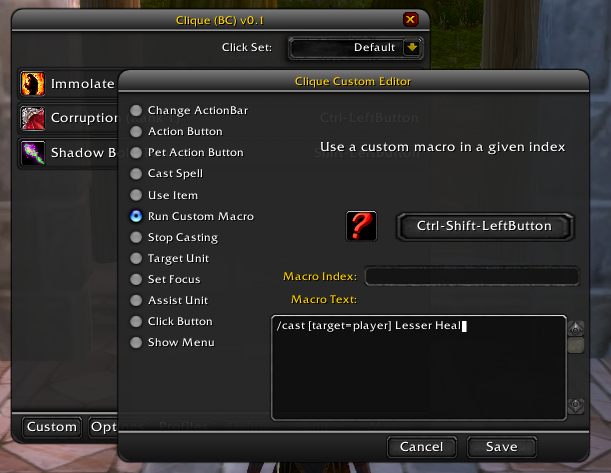
Clique is a simple GUI that lets you assign click-casting for any number of unit frames. Click casting allows you to define the behavior the game takes when you click on a frame. This can be casting spells, running a macro, using an item, or something as simple as changing targets or assisting a unit.
To begin with Clique, simply open your spellbook, and click the new tab that exists there. This is the Clique configuration tab, and you can open it anytime you are not in combat to configure your clicks.
If all you want is simple spell casting, find the spell in your book, and click on it (using the combination of keys and mouse button you would like) and it will be added to the list on the right-hand pane. You can always cast the MAX rank of a spell, by clicking the "Max" button when you have a spellcast selected.
In addition to basic click-casting, Clique has the concepts of click-sets. There are four different click-sets that can be selected (in the upper right-hand corner):
* Default: These are the fall-through actions that will be used when another action isn't found.
* Harmful actions: These actions will be taken if you are clicking on a mob that is hostile to you (i.e. it's attackable). This allows you to define a different set of clicks for enemies.
* elpful actions: These actions will be taken if you are clicking on a mob that is an ally (i.e. it's assistable). This allows you to define a different set of clicks for supporting your allies.
* Out-of-combat: These clicks override any other click-set, and only exist when you are out-of-combat (such as buffing your party, etc). This prevents you from say, group buffing in the middle of combat, costing half of your mana bar.
Steelseries MMO (WoW) Gaming Mouse
I have added support for the Steelseries MMO (WoW) gaming mouse, but the driver needs to be configured in a specific way in order to make things work intelligently. By default the mouse is configured to send commands to game, and can be configured through the configuration program. It does this by sending the appropriate keyboard commands (such as M for opening the world map). This is obviously a bad way to operate.
In patch 3.2.2, WoW added native support for this sort of mouse, with higher buttons that range up through 32. Do the following:
1. Open the Steelseries configuration program
2. For the six buttons on the side, the four extra buttons on top and the two buttons on the right, right click them and select "Disable/Clear"
3. Uncheck the "Enable in-game mode" checkbox
4. Log into WoW and open the Interface Options menu
5. Select the "Mouse" sub-category
6. Check the "Detect WoW Mouse" checkbox, and ensure that WoW is able to detect your mouse.
Once this is done, you can just use the buttons as you do the left and right buttons. You can configure them in Clique, in the Key Bindings menu, or anywhere that the others might be allowed.
Clique may work with other mice such as the Razr Naga, but I'm unable to confirm this without a mouse to test with.
I am an addon author, how do I register my frames for click-casting?
It's simple, and it works for more addons than just Clique. You just run the following code first, to make sure the global table exists. Then you add your buttons to the table with the FRAME object as the key, and true as the value, like so.
ClickCastFrames = ClickCastFrames or {}
ClickCastFrames[PlayerFrame] = true
Now any addon that implements this click-casting standard will see and recognize your frames. You should ensure that all of the buttons you register in this way have names, so they can appear in configuration screens.
Clique and dual talent specs
In addition Clique allows you to set up different profiles, and can automatically switch between them when your character changes talent groups. In order to set this up, simple create the two profiles you would like to use (on the Profiles) button, and then open the Options button to set them to your primary and secondary specs.
http://www.wowinterface.com/forums/showthread.php?t=7106
Do not post bugs in my comments. If you find a bug, post it on my issues list, or it won't get fixed. I do not have the time to wade through these comments, and the forums, and fix the issues. Thanks.
http://code.google.com/p/wow-clique/issues/list
Here are some videos of how to use Clique:
Healing with Grid and Clique by Bufe
http://www.bufe.no/tutorials/
* Please note, Clique does not need any of the software downloaded in this video, other than Clique itself. Clique works with the default UI and most unit frame addons. You do NOT need to download WowAceUpdater or Grid in order to use Clique *
Introduction to Clique
http://video.google.com/videoplay?docid=4942694326108730311
Rebinding Menu, other Advanced Features
http://video.google.com/videoplay?docid=-2658605783428405078
Creating a custom macro in Clique[b]
http://video.google.com/videoplay?docid=-5495589369861870162
[b]How to use Clique
1. Install the addon
2. Open your spellbook
3. You should see a new tab. This is the Clique configuration UI. Click on this tab to open the Clique UI
4. You should see a row of buttons at the bottom, but lets ignore them for now.
5. Navigate to a spell in your spellbook (It can be anything that isn't passive, including Pet spells)
6. Click directly on the spell, holding down any of the Alt/Control/Shift keys in combination, or none of them.
7. This defines a "click-cast" in the CliqueUI. Now anytime you use that combination of modifiers and button on any unit frame which is defined as click-castable, you will cast the spell ON THAT UNIT if its able to be a targeted spell.
8. Click on the Clique tab again, to close the configuration UI
How do I STOP Clique from click-casting on a specific frame, but leave it active on others
1. Open the spellbook
2. Open the Clique UI
3. Click the "Options" button.
Any frames that are checked will be managed by Clique. Simply find the frame in the list, and uncheck it. If you don't know the name of a frame you can use the following script, while putting your mouse over the frame:
/script ChatFrame1:AddMessage("You are hovering over frame: " .. GetMouseFocus():GetName())
How do I set up common profiles for my priests, for example
1. Open the spellbook
2. Open the Clique UI
3. Click on the "Profiles" button
4. Click on the "New" button
5. Type in the name of the profile you'd like to create, say "Priests"
6. Click "Ok"
7. You will see confirmation in your main chat frame that Clique has changed to the new profile.
How do I select that profile on another character, so they can share?
1. Open the spellbook
2. Open the CliqueUI
3. Click on the "Profiles" button
4. Select the profile you would like to choose
5. Click on the "Set" button
6. You will see confirmation in the main chat frame that Clique has changed to the profile.
Wild Growth does not work properly!
This is an issue with World of Warcraft's resolution of Wild Growth targets. There's nothing that I can do to fix it, but you can use the following Clique macro instead of binding the spell directly:
/cleartarget
/cast [target=mouseover] Wild Growth
/targetlasttarget
Donations:
Some people have asked, so here is a way to send me donations:
https://www.paypal.com/en_US/i/btn/btn_donateCC_LG.gif

Clique
Downloads offline
Clique is a simple GUI that lets you assign click-casting for any number of unit frames. Click casting allows you to define the behavior the game takes when you click on a frame. This can be casting spells, running a macro, using an item, or something as simple as changing targets or assisting a unit.
To begin with Clique, simply open your spellbook, and click the new tab that exists there. This is the Clique configuration tab, and you can open it anytime you are not in combat to configure your clicks.
If all you want is simple spell casting, find the spell in your book, and click on it (using the combination of keys and mouse button you would like) and it will be added to the list on the right-hand pane. You can always cast the MAX rank of a spell, by clicking the "Max" button when you have a spellcast selected.
In addition to basic click-casting, Clique has the concepts of click-sets. There are four different click-sets that can be selected (in the upper right-hand corner):
* Default: These are the fall-through actions that will be used when another action isn't found.
* Harmful actions: These actions will be taken if you are clicking on a mob that is hostile to you (i.e. it's attackable). This allows you to define a different set of clicks for enemies.
* elpful actions: These actions will be taken if you are clicking on a mob that is an ally (i.e. it's assistable). This allows you to define a different set of clicks for supporting your allies.
* Out-of-combat: These clicks override any other click-set, and only exist when you are out-of-combat (such as buffing your party, etc). This prevents you from say, group buffing in the middle of combat, costing half of your mana bar.
Steelseries MMO (WoW) Gaming Mouse
I have added support for the Steelseries MMO (WoW) gaming mouse, but the driver needs to be configured in a specific way in order to make things work intelligently. By default the mouse is configured to send commands to game, and can be configured through the configuration program. It does this by sending the appropriate keyboard commands (such as M for opening the world map). This is obviously a bad way to operate.
In patch 3.2.2, WoW added native support for this sort of mouse, with higher buttons that range up through 32. Do the following:
1. Open the Steelseries configuration program
2. For the six buttons on the side, the four extra buttons on top and the two buttons on the right, right click them and select "Disable/Clear"
3. Uncheck the "Enable in-game mode" checkbox
4. Log into WoW and open the Interface Options menu
5. Select the "Mouse" sub-category
6. Check the "Detect WoW Mouse" checkbox, and ensure that WoW is able to detect your mouse.
Once this is done, you can just use the buttons as you do the left and right buttons. You can configure them in Clique, in the Key Bindings menu, or anywhere that the others might be allowed.
Clique may work with other mice such as the Razr Naga, but I'm unable to confirm this without a mouse to test with.
I am an addon author, how do I register my frames for click-casting?
It's simple, and it works for more addons than just Clique. You just run the following code first, to make sure the global table exists. Then you add your buttons to the table with the FRAME object as the key, and true as the value, like so.
ClickCastFrames = ClickCastFrames or {}
ClickCastFrames[PlayerFrame] = true
Now any addon that implements this click-casting standard will see and recognize your frames. You should ensure that all of the buttons you register in this way have names, so they can appear in configuration screens.
Clique and dual talent specs
In addition Clique allows you to set up different profiles, and can automatically switch between them when your character changes talent groups. In order to set this up, simple create the two profiles you would like to use (on the Profiles) button, and then open the Options button to set them to your primary and secondary specs.
http://www.wowinterface.com/forums/showthread.php?t=7106
Do not post bugs in my comments. If you find a bug, post it on my issues list, or it won't get fixed. I do not have the time to wade through these comments, and the forums, and fix the issues. Thanks.
http://code.google.com/p/wow-clique/issues/list
Here are some videos of how to use Clique:
Healing with Grid and Clique by Bufe
http://www.bufe.no/tutorials/
* Please note, Clique does not need any of the software downloaded in this video, other than Clique itself. Clique works with the default UI and most unit frame addons. You do NOT need to download WowAceUpdater or Grid in order to use Clique *
Introduction to Clique
http://video.google.com/videoplay?docid=4942694326108730311
Rebinding Menu, other Advanced Features
http://video.google.com/videoplay?docid=-2658605783428405078
Creating a custom macro in Clique[b]
http://video.google.com/videoplay?docid=-5495589369861870162
[b]How to use Clique
1. Install the addon
2. Open your spellbook
3. You should see a new tab. This is the Clique configuration UI. Click on this tab to open the Clique UI
4. You should see a row of buttons at the bottom, but lets ignore them for now.
5. Navigate to a spell in your spellbook (It can be anything that isn't passive, including Pet spells)
6. Click directly on the spell, holding down any of the Alt/Control/Shift keys in combination, or none of them.
7. This defines a "click-cast" in the CliqueUI. Now anytime you use that combination of modifiers and button on any unit frame which is defined as click-castable, you will cast the spell ON THAT UNIT if its able to be a targeted spell.
8. Click on the Clique tab again, to close the configuration UI
How do I STOP Clique from click-casting on a specific frame, but leave it active on others
1. Open the spellbook
2. Open the Clique UI
3. Click the "Options" button.
Any frames that are checked will be managed by Clique. Simply find the frame in the list, and uncheck it. If you don't know the name of a frame you can use the following script, while putting your mouse over the frame:
/script ChatFrame1:AddMessage("You are hovering over frame: " .. GetMouseFocus():GetName())
How do I set up common profiles for my priests, for example
1. Open the spellbook
2. Open the Clique UI
3. Click on the "Profiles" button
4. Click on the "New" button
5. Type in the name of the profile you'd like to create, say "Priests"
6. Click "Ok"
7. You will see confirmation in your main chat frame that Clique has changed to the new profile.
How do I select that profile on another character, so they can share?
1. Open the spellbook
2. Open the CliqueUI
3. Click on the "Profiles" button
4. Select the profile you would like to choose
5. Click on the "Set" button
6. You will see confirmation in the main chat frame that Clique has changed to the profile.
Wild Growth does not work properly!
This is an issue with World of Warcraft's resolution of Wild Growth targets. There's nothing that I can do to fix it, but you can use the following Clique macro instead of binding the spell directly:
/cleartarget
/cast [target=mouseover] Wild Growth
/targetlasttarget
Donations:
Some people have asked, so here is a way to send me donations:
https://www.paypal.com/en_US/i/btn/btn_donateCC_LG.gif
top