-
-
Downloads offline
Downloads: 113018
File Size: 995634
Version: alpha 11
Author: DarN
-
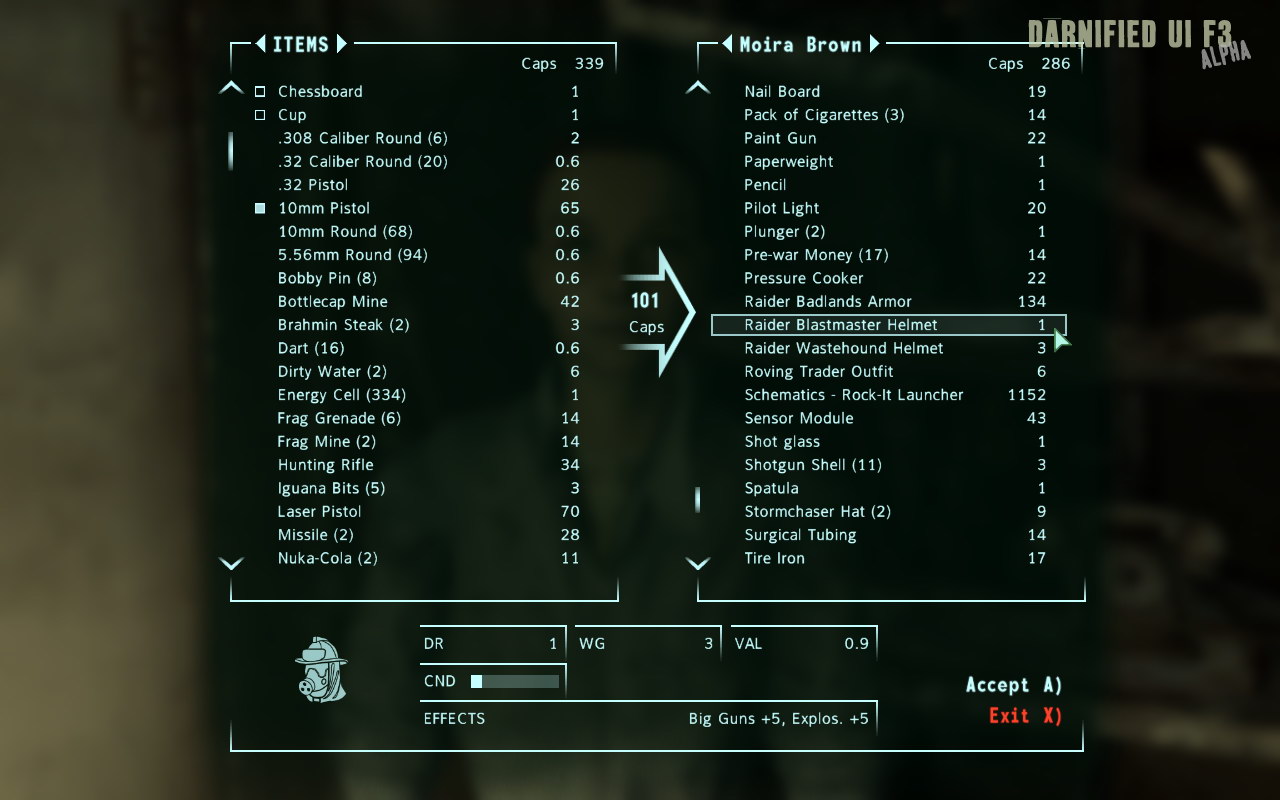
If you're unfamiliar with DUI for Oblivion, the goal is to make the UI look more at home on the PC. This means smaller fonts, more visible items in the lists, and scaling of some elements. Though improved, the F3 ui is a little too big for my taste, hence DUI F3. As with the other version, I will try to implement settings where appropriate. Settings can be found in DatamenusprefabsDUIF3Settings.xml.
◊ Install FOMOD:
This is the recommended install method. The script will edit the ini with the proper values for you, and copy the files to their proper location.
* Back up your menus folder if you have one.
* Extract zip to Fallout 3fommmods
* Activate the mod in FOMM Package Manager
◊ Install 7z:
* Back up your menus folder if you have one.
* Extract to Fallout 3Data.
* Activate DarNifiedUIF3.esp in FOMM or the F3 launcher.
* Activate DUIF3Extras.esp in FOMM or the F3 launcher if you use FOSE.
* Edit your Fonts section like so in the ini:
[Fonts]
;sFontFile_1=TexturesFontsGlow_Monofonto_Large.fnt
sFontFile_1=TexturesFontsDarN_FranKleinBold_14.fnt
;sFontFile_2=TexturesFontsMonofonto_Large.fnt
sFontFile_2=TexturesFontsDarN_FranKleinBold_16.fnt
sFontFile_3=TexturesFontsGlow_Monofonto_Medium.fnt
;sFontFile_4=TexturesFontsMonofonto_VeryLarge02_Dialogs2.fnt
;sFontFile_4=TexturesFontsDarN_FranKleinBold_Otl_12.fnt
sFontFile_4=TexturesFontsDarN_Sui_Generis_Otl_10.fnt
sFontFile_5=TexturesFontsFixedsys_Comp_uniform_width.fnt
;sFontFile_6=TexturesFontsGlow_Monofonto_VL_dialogs.fnt
;sFontFile_6=TexturesFontsDarN_PetitaMedium_Outline_18.fnt
;sFontFile_6=TexturesFontsDarN_Forgotten_Futurist_Otl_18.fnt
sFontFile_6=TexturesFontsDarN_Sui_Generis_Otl_13.fnt
;sFontFile_7=TexturesFontsBaked-in_Monofonto_Large.fnt
sFontFile_7=TexturesFontsDarN_Libel_Suit_Otl_24.fnt
;sFontFile_7=TexturesFontsDarN_Klill_Outline_20.fnt
sFontFile_8=TexturesFontsGlow_Futura_Caps_Large.fnt
This font setup has the original entries commented out, along with some alternatives you can use. The game default will be the first comment for the entry if there are more than one.
* Make sure bInvalidateOlderFiles is set to 1 in the ini.
Ini location:
XP = My DocumentsMy gamesFallout3FALLOUT.INI
Vista/Win7 = UsersYOUR NAMEDocumentsMy GamesFallout3FALLOUT.INI
◊ Uninstall FOMOD:
* Deactivate the mod in the FOMM Package Manager
◊ Uninstall 7z:
* Remove the files copied. Keep track if you use more UI mods, or just delete the menus folder if this is the only one.
* Delete Meshesterminalsplayerfacelights01.nif
* Delete Texuresdarn
* Revert any ini changes made.
◊ Usage:
The only things you'll notice to begin with are the new fonts and scale changes. I have tried to keep as close to the original look as possible beyond these. To further customize the UI, open the config file (prefabs/DUIF3Settings.xml), and have a look at the options there. I've tried to place comments in there as much as possible to explain the various options. Happy tweaking. :)
◊ Troubleshooting:
Should you experience CTD's or other difficulties,
* Make sure to edit the ini properly
* Verify that all files are where they should be
* Make sure none of the files are listed in ArchiveInvalidation.txt
* Test the mod by itself - no other mods installed
◊ Known issues:
* The highlighted limb in V.A.T.S is an imagespace effect hardcoded to use the (game options') HUD color. This can't be fixed from xml, so you might wanna set your HUD color to something matching in the options menu.
NOTE: The hotfix is a patch - you need a11 to be installed first. Users upgrading from a10 should delete DUIF3Extras.esp. Only DarNifiedUIF3.esp is used from now on.
Changes a11 - a11.1
* Fixed FOOK2 NVMeter
* Fixed missing BreathMeter
* Cleaned up some scripts
* DarNified the HotKeys grid
Changes a10 - a11:
* Fixed wrong color for Encumbrance meter
* Fixed word wrap in Message Menu
* Fixed Map note clipping
* Fixed bug in FOSE version output
* Fixed message bracket showing up for blocked messages (eg. FWE karma)
* Fixed some rare StatsMenu XB360 controller issues (shiholude)
* Fixed DUI settings for XB360 controller users
* Fixed bug with skills > 100
* Skills > 100 now get updated and saved in the LevelUp Menu
* Made Empty/Locked/Requires Key/etc text red
* Merged the esps
* Changed Info area action text/hotkey color to match HUD
* Changed V.A.T.S hotkeys/buttons color to match HUD
* Remade message bracket (dynamic size)
* Improved xtras script time update (wait/sleep)
* Placed scale limits on some elements to prevent text overlap (eg. ammo)
* Some general optimizations in HUD code
* DarNified the Crippled Limbs Indicator
* Added documentation
* Added Energy, EMP, Frost, and Electric Resistances to stats HUD
* Added Combat Indicator to the HUD
* Added setting to override alpha for the crosshair
* Added FWE Primary Needs meters (FWE 4.0) (tmp esp included)
* Added FOOK2 Night Vision recharge meter
DarNified UI F3
Downloads offline
If you're unfamiliar with DUI for Oblivion, the goal is to make the UI look more at home on the PC. This means smaller fonts, more visible items in the lists, and scaling of some elements. Though improved, the F3 ui is a little too big for my taste, hence DUI F3. As with the other version, I will try to implement settings where appropriate. Settings can be found in DatamenusprefabsDUIF3Settings.xml.
◊ Install FOMOD:
This is the recommended install method. The script will edit the ini with the proper values for you, and copy the files to their proper location.
* Back up your menus folder if you have one.
* Extract zip to Fallout 3fommmods
* Activate the mod in FOMM Package Manager
◊ Install 7z:
* Back up your menus folder if you have one.
* Extract to Fallout 3Data.
* Activate DarNifiedUIF3.esp in FOMM or the F3 launcher.
* Activate DUIF3Extras.esp in FOMM or the F3 launcher if you use FOSE.
* Edit your Fonts section like so in the ini:
[Fonts]
;sFontFile_1=TexturesFontsGlow_Monofonto_Large.fnt
sFontFile_1=TexturesFontsDarN_FranKleinBold_14.fnt
;sFontFile_2=TexturesFontsMonofonto_Large.fnt
sFontFile_2=TexturesFontsDarN_FranKleinBold_16.fnt
sFontFile_3=TexturesFontsGlow_Monofonto_Medium.fnt
;sFontFile_4=TexturesFontsMonofonto_VeryLarge02_Dialogs2.fnt
;sFontFile_4=TexturesFontsDarN_FranKleinBold_Otl_12.fnt
sFontFile_4=TexturesFontsDarN_Sui_Generis_Otl_10.fnt
sFontFile_5=TexturesFontsFixedsys_Comp_uniform_width.fnt
;sFontFile_6=TexturesFontsGlow_Monofonto_VL_dialogs.fnt
;sFontFile_6=TexturesFontsDarN_PetitaMedium_Outline_18.fnt
;sFontFile_6=TexturesFontsDarN_Forgotten_Futurist_Otl_18.fnt
sFontFile_6=TexturesFontsDarN_Sui_Generis_Otl_13.fnt
;sFontFile_7=TexturesFontsBaked-in_Monofonto_Large.fnt
sFontFile_7=TexturesFontsDarN_Libel_Suit_Otl_24.fnt
;sFontFile_7=TexturesFontsDarN_Klill_Outline_20.fnt
sFontFile_8=TexturesFontsGlow_Futura_Caps_Large.fnt
This font setup has the original entries commented out, along with some alternatives you can use. The game default will be the first comment for the entry if there are more than one.
* Make sure bInvalidateOlderFiles is set to 1 in the ini.
Ini location:
XP = My DocumentsMy gamesFallout3FALLOUT.INI
Vista/Win7 = UsersYOUR NAMEDocumentsMy GamesFallout3FALLOUT.INI
◊ Uninstall FOMOD:
* Deactivate the mod in the FOMM Package Manager
◊ Uninstall 7z:
* Remove the files copied. Keep track if you use more UI mods, or just delete the menus folder if this is the only one.
* Delete Meshesterminalsplayerfacelights01.nif
* Delete Texuresdarn
* Revert any ini changes made.
◊ Usage:
The only things you'll notice to begin with are the new fonts and scale changes. I have tried to keep as close to the original look as possible beyond these. To further customize the UI, open the config file (prefabs/DUIF3Settings.xml), and have a look at the options there. I've tried to place comments in there as much as possible to explain the various options. Happy tweaking. :)
◊ Troubleshooting:
Should you experience CTD's or other difficulties,
* Make sure to edit the ini properly
* Verify that all files are where they should be
* Make sure none of the files are listed in ArchiveInvalidation.txt
* Test the mod by itself - no other mods installed
◊ Known issues:
* The highlighted limb in V.A.T.S is an imagespace effect hardcoded to use the (game options') HUD color. This can't be fixed from xml, so you might wanna set your HUD color to something matching in the options menu.
NOTE: The hotfix is a patch - you need a11 to be installed first. Users upgrading from a10 should delete DUIF3Extras.esp. Only DarNifiedUIF3.esp is used from now on.
Changes a11 - a11.1
* Fixed FOOK2 NVMeter
* Fixed missing BreathMeter
* Cleaned up some scripts
* DarNified the HotKeys grid
Changes a10 - a11:
* Fixed wrong color for Encumbrance meter
* Fixed word wrap in Message Menu
* Fixed Map note clipping
* Fixed bug in FOSE version output
* Fixed message bracket showing up for blocked messages (eg. FWE karma)
* Fixed some rare StatsMenu XB360 controller issues (shiholude)
* Fixed DUI settings for XB360 controller users
* Fixed bug with skills > 100
* Skills > 100 now get updated and saved in the LevelUp Menu
* Made Empty/Locked/Requires Key/etc text red
* Merged the esps
* Changed Info area action text/hotkey color to match HUD
* Changed V.A.T.S hotkeys/buttons color to match HUD
* Remade message bracket (dynamic size)
* Improved xtras script time update (wait/sleep)
* Placed scale limits on some elements to prevent text overlap (eg. ammo)
* Some general optimizations in HUD code
* DarNified the Crippled Limbs Indicator
* Added documentation
* Added Energy, EMP, Frost, and Electric Resistances to stats HUD
* Added Combat Indicator to the HUD
* Added setting to override alpha for the crosshair
* Added FWE Primary Needs meters (FWE 4.0) (tmp esp included)
* Added FOOK2 Night Vision recharge meter
top